Change of name of a company, splitting up or consolidating a company.

Change of company
Targets
Assistants help you with renaming and splitting up companies as well as with transferring data and employees to a new company record in a controlled manner. The wizard automatically establishes the history relationship with the predecessor.
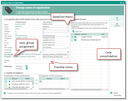
Assistant for change of name
Changing the company name
Transferring company A to company B:
- Execute the Change of name function for the company A.
- In the assistant, maintain the data of the succession company, e.g., modify its name.
- Take down a Change note (can be seen in the company history).
- Determine which open cases should be transferred
- Specify the addresses and properties to be transferred
- Selected and apply all or selected staff members
- Transfer communication data of the successor company to the staff members
Result
- The status of the predecessor company A is automatically set to inactive.
- Successor company B is created.
- Transferred employees of the company A receive the inactive status.
- Transferred employees are created automatically and are assigned to the company B.
- The history relations are built and displayed for the company and the person as a tree (Contacts relation tab).
- The relation with the selected cases is changed and also the relation in every open activity in which a selected case is set as the main project.
Splitting up a company
Company A is split into companies B and C. The Change of name function needs to be executed twice for the company A. In this process, the respective staff members need to be divided between the two successor companies.
- First change of name in the company A as usual.
- With the second change of name, one can see in the assistant under Transfer of employees inactive (red) staff members. These were already transferred to the successor company B and should not be transferred once again to company C.
Note: With the second change of name, please pay attention to the fact that the status of the successor company C needs to be set explicitly. Otherwise, the current inactive status from the predecessor company A is applied.
Consolidating companies
Company A is split into the companies B and C. The Change of name function needs to be executed twice for the company A. In this process, the respective staff members need to be divided between the two successor companies.
- First change of name in the company A as usual.
- With the second change of name, one can see in the assistant under Transfer of employees inactive (red) staff members. These were already transferred to the successor company B and should not be transferred again to company C.