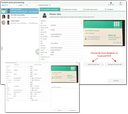
Marking persons for postprocessing always creates post- records in the intermediate CPPW table. All contacts marked like this (whether in the app or in the web client) are associated with a postprocessing record.
During postprocessing, contacts are created, or existing ones are updated in the database.
The contact postprocessing wizard (CPPW) can be launched
- via the Extras/Contact Postprocessing menu. Initially, all postprocessing records with an open postprocessing status are loaded.
- for a person via Contact post processing. Only this person will be loaded into CPPW.
- for an appointment using Post process attendees. This determines all contacts with an open postprocessing status from the attendee list of the appointment and loads them into the CPPW.
- in the Fair lead import (Extras/Fair lead import menu). At the selected fair report (appointment) using the Contact post processing select function.