See also: Settings for duplicate management, environment variables

Extended duplicate search
Contacts consist of several attributes. The attributes (character strings) relevant for contact duplicates are Name, Phone, E-mail, URL, City, Street, Zip.
The strings are first broken down into words or tokens. Among other things, stop characters are considered. Then, a check is made to determine the number of tokens the two strings to be compared have in common. Tokens found more often in the string concerned are weighted higher, and tokens occurring in almost every string are weighted lower. Each comparison step yields TRUE or FALSE, and the steps are combined with OR.
Equality
Between two contacts, the same attributes are first compared for equality (case insensitive) on the basis of the tokens. If the attribute values are not equal, then their Levenshtein distance is checked.
Levenshtein distance
The Levenshtein distance describes the minimum number of changes required to generate the second string from the first one. Added, removed and substituted characters are regarded as changes. For example, punctuation characters are eliminated, which may quickly lead to a match of the two attribute values. If there is no match even with this algorithm, a phonetic comparison after Beider-Morse is performed.
Phonetic comparison after Beider-Morse
This algorithm is for identifying similar names, even if they are spelled differently or are written in different languages. Unlike Soundex, it does not generate numerous false hits and can analyze multiple languages.
Token valuation
All tokens recognized as identical yield a rating factor: Number of all matching tokens / number of all tokens. The valuation factor is multiplied by the score of the duplicate attribute, resulting in the valuation of the attribute. Divergent correlations of the tokens reduce the valuation factor accordingly.
By valuating duplicates (valuation dialog for the threshold value of the attributes), you can adjust the token valuation via the weighting of the respective attribute.
In the end, the sum of all scores yields the duplicate score, which is compared to the level target that finally decides whether the contact is a duplicate.
It always strongly depends on the data in which direction the valuation for a duplicate tends.
Special letters (Á,À,Å,Ä ...) are considered in the component comparison (phonetic comparison). With names, accents marks are removed prior to the name valuation, which may cause the valuation to find possible duplicates.

Admin: Due to the revised duplicate search, the previous name search is no longer performed, and thus the implied prioritization of the name has been dropped. The settings for the permutation depth of the duplicate check (PSA_QUE_DEP_%) are no longer relevant in current JustRelate CRM versions.
For valuating the phone number, The PSA_DBL_PNT_PRS_TEL and PSA_DBL_PNT_ORG_TEL variables are now available, with 10 as their default. The attribute has been integrated into the modal score dialog.
Automatic duplicate check after evaluation
Checking a quantity of contacts (persons or companies) for duplicates means selecting records whose master record already exists in the database.
An evaluation scheme helps you to decide whether a record is selected as a duplicate. The scheme is formed by means of environment variables.
Manual duplicate check as an administrator
A manual duplicate check (see contact data correction in duplicate management) automatically opens a dialog that allows you to specify a gradual evaluation scheme, according to which records are regarded as duplicates.
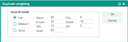
Evaluation dialog for the threshold value of the attributes
An administrator can define the default levels by means of the variables PNT_MOD_1_ORG, PNT_MOD_1_PRS, etc. These are collective entries for the Unsharp, Medium and Sharp presets and the corresponding presets for the field scoring.
All contacts with a name similar to that of the contact being examined are checked. For records with a similar name, the fields STR, ZIP, CIT, EMA, URL and TEL are additionally evaluated.
Those contacts that have more than 60 points (levels) according to the evaluation scheme are included in the duplicate set. From this set, the oldest record (master record) is marked as such. The key of the master record (field DBL_MAS_GID in PSA_CON) is added to all duplicate records so that they are then marked as duplicates of the master for resolving. The administrator can have the duplicates displayed in the resolving form.