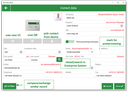
Incomplete records can be updated, regardless of the form in which a contact reaches the capture app (OCR, QR or local contact from the device).
Contacts captured in the business card app or in the context of a fair or visit report can be supplied with offline and online data from the server via the same selector (magnifying glass). Incomplete records are updated in the database from complete attributes in the enterprise system, depending on the data conditions.
The selectors in the recording apps that combine offline data with server records, when opened, show the records set by the server at the initial start of the mask if the server is accessible. Otherwise, it will continue to show the local records.
If the magnifying glass (selector) is pressed for a contact in the recording app, a search can be performed on the offline record using a search string to match or qualify the recorded contact. If no corresponding offline data is found, tap "Reload/Search" (magnifying glass) again for the data to be searched on the server (requires the backend 1.5.100 to provide an initial server context).
By selecting and accepting a contact from the search, the combined attributes from the server (marked in color) appear above the fields in the recording app.
By manually replacing attributes directly in a field (by tapping) or using the toggle (Old/New) for all fields at once, the attributes are merged, regardless of whether it’s offline or online data.