Applying standard filters

JustRelate CRM comes with standard filters that every user can use or copy and modify as needed. The provided filters are helpful for first stan­dard queries.

  • Open any form or list.
  • At the top left, next to the funnel icon, click the small arrow in the field to display the filter selection list.
  • Select a filter. The search result is immediately loaded into the mask.
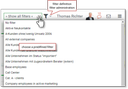
Filter selection in a company form

Attention

Attention: When closing a mask, the filter most recently used for it is saved. The next time you open this form, the filter result is loaded immediately. For a new search, you should always execute the "Clear" function (rubber) in the Quickfinder bar, and only then search using the Quickfinder.
If a filter is active, a quick search in the Quickfinder leads to a further restriction of the results delivered by the filter. Notice that an entry in the Quickfinder overwrites the search entry for the field in the filter.