The Transfer documents from process function lets you manually transfer standard folders and documents from a process to a case. The function opens a follow-up dialog for further, more detailed specification of the elements. Please note:

Applying standard folder structures from a process
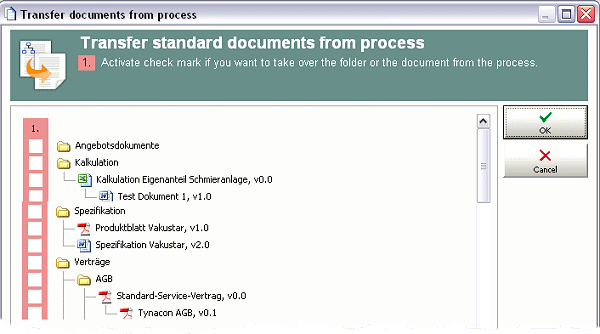
Transfer of folder structures and documents
- When selecting a document, its path is resolved, and the path folders are also taken over. The assignment of already existing folders and documents with an identical name to the same level is prevented. New documents are thus automatically filed into already available folders.
- The process determines how a document is handled when it is taken over (with or without making a copy). This cannot be specified in the dialog.
In the dialog, elements can be specially marked:
- NEW: The creation date of the relation between the process and the folder or document is before the project date.
- (only in the status: …): The folder or document can only be taken over in its current status.
The function helps, for example, with versions of an offer that are chronologically far apart. You can check whether the process standards have changed for documents related to quotes and adjust them if necessary.
Deriving a document
This function supports you in particular with processing case-specific documents quickly. It is available in the function bar if a document is marked in the document relation list (Documents tab).
See also: Deriving documents