For processes, additional document-related functions are available in the function bar (functions in the subdialog). They support you with processing especially case-specific documents quickly:

Advanced functions
Derive document
This function supports quick processing of case-specific documents in particular and is primarily useful for processes. It is available in the function bar if a document is selected in the list of document relationships (Documents tab).
An existing document can be used as a template for a new, independent document. To do this, copy the source document, create a new assignment and remove the document assignment of the object to the previous source document. The function can always be used if, for example, you have imported a briefcase with released sample documents from the browser into a case and now want to derive a company or case-specific document. The new subject or file name is queried in a dialog. After editing, the derived document should be released by the agent.
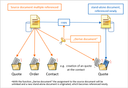
Derivation of a document after creating a quote from a contact
The function also supports the versioning of derived documents. In this case, the source document is copied to a new version and can be adapted to be process-specific or contact-specific. As a new version, you will also find the document in the version history of the source document.
If you do not create a new version when deriving a document, the source document and the new document do not have a common history.