The Transfer function also copies folder structures. If the Copy Documents option is set, the agent can specify in the next dialog in detail which folders and documents should be assigned to the new object (project/case).

Transferring documents together with a case
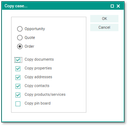
Transferring and copying all documents
Note: When choosing the "Transfer standard documents from process" option, the system automatically suggests - depending on the transfer scenario - the optimum setting for you, namely as follows:
Transfer to other case type (e.g., quote to order)
The Standard Folder/Transfer documents from the process option is activated. The system assumes that you require new "templates" for the order. If documents relevant to quotes are also needed, e.g., the scope of supply or a detailed statement for the completion of the documents confirming an order, you can select and copy them.
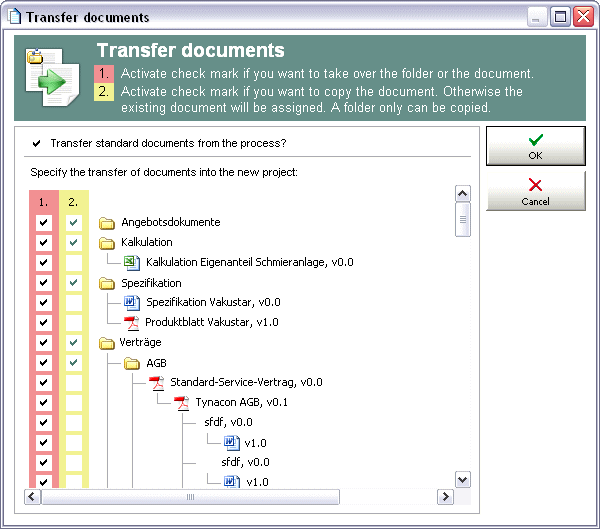
Transfer of document structures when transferring a quote to an order
Transfer (copy) to the same case type (e.g., quote 1 to quote 1.1)
The Standard Folder/Transfer documents from the process option is deactivated. The system assumes that you will further use and rework already existing and associated documents in a new quote version. This is why case-specific (not global) elements are already preselected for the transfer.
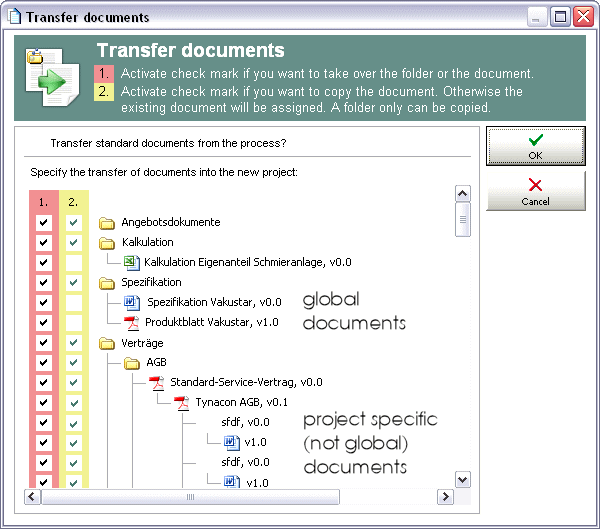
Transfer of document structures when transferring a quote to another version of this quote
Note: The system assumes that global documents (global flag ON) are only referenced (accepted) and not copied, so the system does not set the copy checkmark. Non-global documents (global flag OFF) are usually case-specific documents and thus marked by the system for copying.