For processes, a standard folder structure can be set. The procedure corresponds to that of standard activities when a user creates a process. A standard folder structure is automatically assigned to an object with a process, e.g., to an offer, when it is created or its status changes. The folder structure can contain documents, enabling you to provide document "templates" or neutral documents for the process.

Default standard folder structures of processes

Attention: All standard documents and standard document folders that are configured in the process definition should have the global flag and should not have any access restrictions. Access will be ensured from the process itself via inheritance of the access permissions of the process.
Process recommendation, scenarios
In connection with this feature, The following scenarios are worth considering. We use the following terms:
- Standard document: This refers to all documents provided in the process. These are mostly document "templates" or neutral documents.
- Document "template" (not to be confused with JustRelate CRM templates): A "template" that is copied and manually adapted within a specific case (such as a standardized quotes or calculation sheet in which positions and prices are entered manually if, e.g., no quoting is used).
- Neutral document: This refers to, for example, general terms and conditions or standard contract documents that are always part of the documentation of cases, but do not include case-specific content.
Scenario: Setting default process folder structures
Here, the administrator can assign standard documents and folders directly to the process (e.g. offers), that are then always automatically available when a user creates a process.
Admin:
- Provide released document "templates" (Word) for the process and set the copy flag.
- Provide released neutral documents (PDF) for the process and do not set the copy flag.
Case agents:
- Case agents work exclusively in the document folder.
- They use a copy of the document "templates" (automatically in development) provided by the process. This copy is the case-specific document already.
- The Derive document function is usually not needed.
- They edit the document, release it and generate a PDF document, if required.
Scenario: Setting default folder structures through briefcases
Here, the user can adapt given standard documents or folders using a document folder, and derive case-specific documents.
Admin:
- Provide released document "templates" (Word) and neutral documents (PDF) in a folder.
Case agents:
- Case agents work exclusively in the document folder.
- They copy the folder (e.g., from the browser) into the case using drag and dro .
- They use the Derive document function in order to derive a case-specific document from a document "template".
- If they forget to copy a template, they cannot edit the original because it is released.
- They edit the document, release it and generate a PDF document if necessary.
See also: Advanced functions (Derive document)
Defining standard process folder structures
The standard-folder structure can be defined in the Standard documents tab of the process definition. There are the following options:
Copy documents automatically
The Copy flag of the process document relation (only visible in the tree subform) controls whether the standard document is either only assigned to the object subject to the process (e.g., an offer), or is copied and assigned.
This makes it possible to automatically create case-specific document copies. The same rules for copying as for the Duplicate standard function apply, but without a version query:
- No new version of the standard document is created, but an original document with a new document number and the same subject and file name.
- The copy of a released document automatically receives the in development document status.
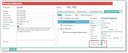
Folder and document structures in the process
Status-dependent assignment of folders and documents
You can specify, which process status automatically makes a folder available in the process. The Status field is only visible if you select a folder.
Elements from the standard-folder structure that don’t have a status (status = blank) will be transferred on creation to the object subject to a process (e.g., offer), those with a status (status = set) when the status changes to the one specified. The following rules apply:
- Folders and documents with a status must be assigned to the first level.
- On assignment, the system checks documents without the copy flag set for identity, and folders for identical names. This prevents multiple allocations, e.g., if a status is taken several times.
Example
On creation of an offer, the “Quote” folder including the offer "template" should be assigned. When the status changes to quote submitted, another neutral document is to be attached to the "Offer" folder. This can be defined as follows in the Standard documents list:
Attention: This refers to the process status. Do not mistake "status" for the document status here.
Folder “Quote” (status = blank);
– Document “Quote template” (status = blank, copy=ON)
Create a second “Quote” folder.
Folder “Quote” (status = quote submitted)
– Document “Neutral” (status = quote submitted, copy=OFF)
See also: Transferring and copying a sales case
Document folder symbol

Admin: If your customizer has defined dedicated folder icons or colors (BLOBs), the customizer can also define the empty and non-empty state. There is the variable PSA_DOC_DIR_CSO_APP_PIC for this. If, for example, a blue (CSO_DIR_BLU) and a red symbol (CSO_DIR_RED) exist, then you can use the valueEMPTY:=CSO_DIR_BLU_EMPTY,NOT_EMPTY:=CSO_DIR_BLUEMPTY:=CSO_DIR_RED_EMPTY,NOT_EMPTY:=CSO_DIR_RED
to define empty and not empty for blue and red folders, if an EMPTY variant of the BLOB exists. Empty blob symbols are defined by the _LGT postfix.