
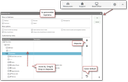
Click the gear icon on the far right of the menu bar. You can now hide or show top menus or submenus (selections) and change their arrangement by drag-and-drop or step-by-step.
Alternatively, you can use the View menu with its submenus, where you can switch various sidebars on or off and adapt the menu bars.