Echobot information at the company

Viewing and synchronizing company information

If you have already captured a company and would like to access further information, open the company form and download the corresponding company.

In the function bar, choose More functions/Open Echobot. A new main form containing the company master data, the employee list and the Echobot window will open. The master data on the left-hand side can compared with the Echobot data, and edited manually.
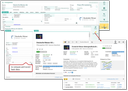
Echobot integration for companies

The Echobot data on the right-hand side is the result of an Echobot search based on a URL that is transferred from the CRM to Echobot. The URL contains either a search string (made up of several significant company attributes, such as its name) or, if available, an Echobot ID that uniquely identifies the company in the Echobot universe. If the search is not unique, several companies may be displayed as hits with your data in the Echobot window.

Using the Reload function, the Echobot data is requested again.

Synchronizing company information to the CRM

The synchronization can be started using the synchronization button in the company header of the Echobot HTML page. An automatic check for company duplicates in the CRM is performed. Usually, exactly one com­pany is found and displayed in the duplicate dialog, namely the company loaded in the dia­log. After confirmation, a merge dialog is presented in which the CRM master data can be compared with the Echobot data at the attribute level and updated.

Note: If the duplicate check finds several companies, this is an indication that the company data stock in the CRM should be cleaned up.

Echobot ID

If empty, the Echobot-ID will be stored at the company in the CRM (last master data field at the bottom left). If it is already present in the CRM, no duplicate check is carried out during the synchronization, and the merge dialog is presented immediately.

“Occasion” field

After creating a new company or employee, the Occasion field is set to “Echobot”. This value can be adjusted by means of the PSA_ECH_BOT_AQU_PLS variable.

Synchronization of employee information to the CRM

The synchronization is done using the synchronization button above the employee list of the Echobot HTML page. It works in the same way as the synchronization of company data (duplicate check, merging of data). Several employees can be synchronized at once.

If an employee is not yet known in the CRM, the dialog for creating a new person is presented, already prefilled with Echobot data.