With JustRelate CRM, conversions are not directly about sales but a measure of the effectiveness of turning lead inquiries into sales or service cases, and are thus a key figure for lead management.

Presentation of the conversion rate
See also: Lead management portal
Conversion rate as a cockpit element
In the JustRelate CRM standard, this implementation is available as the "Conversion Rate" cockpit element. It calculates the ratio between the number of successfully processed lead requests to their total number, and can serve as a basis for conversion optimization in the company processes.

Successful requests
Successful inquiries are queried in the element configuration by the selected Case. In general, only those inquiries that have been assigned to a sales case (quote, order, business opportunity) are included in the evaluation as successful inquiries. The status of the case does not play any role in the evaluation. If, for example, Orders are selected there, only the inquiries with at least one order associated are counted as successful.
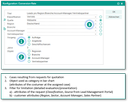
Conversion rate configuration
Representation categories
The conversion rate is displayed in a bar chart that corresponds to a grouping according to an Object that can be selected in the configuration dialog (categories of the chart). The objects are generally attributes of the customer in the assigned case. Thus, only requests that have a sales or service case assigned to them can be categorized. This results in a special formula for the categorized conversion rate.

All lead requests for which the grouping attribute cannot be determined are grouped together in a special category without a designation. The conversion rate is then not shown in the diagram, but can be determined if necessary in the report dialog (popup) that can be accessed via a hyperlink at the element title.
Temporal view
The conversion rate is always checked on an annual basis. By means of the default setting (3), the current year and the two previous years are always included. The number of Years can be adjusted in the configuration dialog. The basis of the annual classification is the start date of the lead request.
Filtering - Quick filter
For a more precise evaluation, it is possible to filter the evaluated lead requests. Attributes of the query (classification, source) and the customer (region, industry, account manager, sales partner) are available for this purpose. For example, in the case of the "Account manager" object (presentation category), the conversion can be restricted to a specific account manager by using the filters.
If an option is selected and highlighted, this selection automatically appears in the quick filter (dropdown) of the element. All other filter selections can also be flexibly used in the quick filter.
Note: If filtering by a customer attribute is selected, this will automatically sort out all lead requests without an associated case.
See also: Using the variable PSA_CCP_ACT_REQ_REG_SCI_DEF_PAR, it is possible to change the default setting of the element before (!) it is put to use for the first time (see also Administration, Cockpit distribution, Adjustment using variables).