In the overview lists of the sales and services cases, you can find the Sales funnel tab next to the Products/services tab.

Sales funnel for sales and service cases
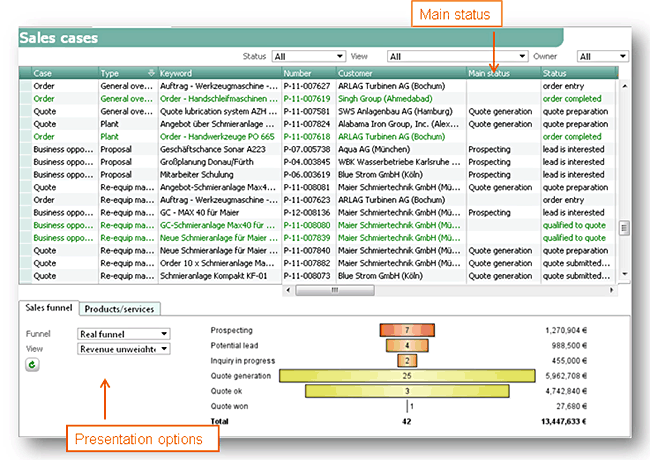
Sales funnel at the overview of all sales cases
How the data should be presented can be selected using menus.
Funnel
A funnel can be presented as a real funnel (the width of the bar corresponds to real case figures) or an ideal funnel (idealized shape of a funnel).
Display
The data can be presented as weighted turnover or unweighted turnover.
The Refresh function in the tab (as an icon) refreshes the sales funnel after data was modified.
In the case list itself, the main status is listed in the corresponding column.
Among other things, the View menu also offers to select, e.g., Opportunity and quotes for a combined sales funnel.
Note: These funnels can also be displayed in the cockpit.
The data source for the funnel function is the search result in the sales overview (case list). Using defined filters via drop-down menus, the desired restrictions can be applied here.
Filters, for example:
- Cases by business agent, sales partner, …
- Cases by business lines …
Basically, three sales funnels can be distinguished:
- Sales funnel across businesses opportunity,
- sales funnel across quotes (offers),
- combined sales funnel (businesses opportunities and quotes)
Presentation of a funnel
Immediately after loading the cases list or after changing the settings, the funnel function determines the number of the loaded cases in the list per main status, creates the graphics and outputs the number of cases and the accumulated turnover values.

Admin: If the search result in the cases list exceeds MaxRec, the search is executed once again in an individual DTO that then serves as the data source.
To the left of the funnel display, you can see the main status. You can see the number of cases directly in the funnel bar.
You can see the respective turnover to the right, next to the funnel presentation. The total row shows the total number of cases and the accumulated turnover.
Note: In the funnel display, no hyperlinks are offered. If you want to open the cases of a main status, use the hyperlink (keyword) in the cases list. For this, the list is sorted by case type (Type) and the main status position in ascending order.