Attention: Note the Discontinuation of the Windows client.

Marketing calendar

The main focus of the marketing calendar is on planning, and giving an overview of marketing actions. Therefore, only open marketing actions and activities of a marketing action are loaded via the initial filters. You can open the calendar from the Sales/Marketing/Marketing calendar top menu.
Note: Functions from modal dialogs that normally open objects non-modally in the Web client (such as Save and Open) cannot be executed and are inactive.
- Create marketing actions directly in the marketing calendar (New menu).
- Interactive graphic planning of events and offensives.
- Scheduling via drag and drop.
- Zoom function, e.g., day, week, month, or quarter view.
- Have significant fields displayed as columns in the action list of the marketing calendar via the context menu (right mouse button on column header). Marketing managers thus have the possibility to track, for example, the marketing budget planning.
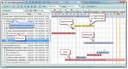
The marketing calendar
Calendar functions
- Filtering by time period in the toolbar.
- The default filter, "Open events/publications", loads all events and publications whose status is “open”. The default activity filter loads all open tasks and appointments.
- You can define your own filters for the first level (marketing actions). If you do not choose any filter, all marketing projects are loaded, regardless of their status.
- The second level displays activities of the marketing action in the first level.
- Marketing actions and activities can be dated interactively in the calendar (by moving and dragging with Shift+D&D).
Note: Some functions of this calendar behave in the same manner as the respective functions of the resource planning table, for example, the options available for non-working hours.