Specific attendee statuses for marketing actions can be defined and set as contact attendee statuses for related follow-up activities.

Attendee status in marketing
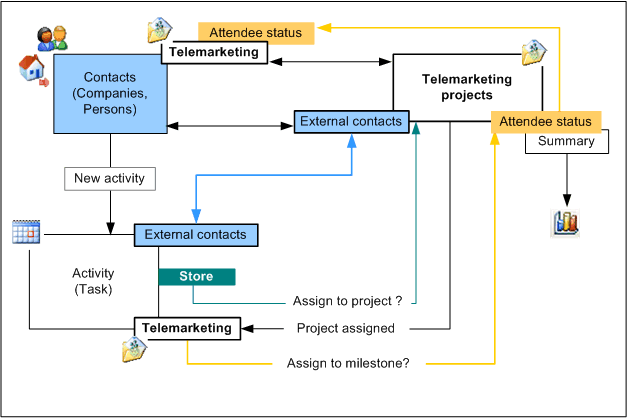
Assignment of attendee status via contact <-> case assignment.
When an activity for a contact is created, changed or deleted (e.g., via the Follow up function), the system checks whether there are attendee statuses for the marketing action. If a marketing action is the main marketing action of an activity (an activity has been assigned as main activity), and there are attendee statuses for this action, the attendee status to be set (milestone) for it is queried when the activity is saved. The selectable menu items originate from the Attendee status tab in the marketing action. There, you can assign a standard attendee status to the marketing action, or define individual ones.
The new attendee status is given to all external contacts of the marketing action who are also assigned to the current activity.
Note: The title of the attendee status can be changed in the Attendee status tab at any time. Doing this, automatically also changes the title of already used attendee statuses. By means of the user variable PSA_HDL_ACT_PRO_CON_STA in My data/Configuration/My settings, you can, if needed, switch off the automatic query about the contact status (milestone) to be allocated in the marketing action. This is for suppressing the query for those agents who should not or don’t need to change the attendee status.

Admin: The standard attendee statuses are managed by the administrator.
Furthermore, the marketing action relation is queried for all activities at contacts. If a marketing action is associated in which attendee statuses were already defined, the query is always automatically performed when an attendee status is set for this marketing action.
Note: The Attendee status list contains the Display field. You can use the flags in this field to cause only attendees with these (selected) attendee statuses to be loaded and displayed when the marketing form is opened. By deactivating display flags for specific attendee statuses, you can initially filter the attendee list.
Attendee status as a report
A report in the report manager is available for the Attendees. It causes all attendee statuses to be displayed as a diagram. The contact status in a marketing action, including the contacts and the number of contacts with this status, is displayed. The status of the action can thus be monitored, and follow-up activities can be coordinated.
Actual value calculation
Using this function in the function bar if the list in the Attendee status tab is active, you can have the actual value of the attendee status calculated regularly. You can see the result in the Actual value or Actual value in % fields of the list. The actual value in percent is only calculated if a target value has been specified.