§ GDPR: Along with a service order, you may capture new contacts. When adding persons, you must observe the GDPR and data protection. See GDPR-compliant registration of persons.

Service order and mission planning
After processing a service call, you can directly create a service order from it. The most important data from the service call is transferred to the order.
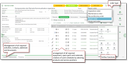
Service order of the repair type with reserved spare parts for a service mission
Service orders support:
- Easy creation directly from a service call, the customer or the customer installation.
- Standard order types for spare part order, start-up, inspection, reconditioning, repair, maintenance.
- Acquiring customer or operator data.
- Assigning service objects.
- Automatically preset mission location and delivery address.
- Automatically preset plant or object from the associated service objects.
- Accepting the customer's preferred date, and detailed planning.
- Planning and arranging the required resources like personnel, working equipment and material or spare parts.
- Selecting of staff members (specialists) by qualification (skills).
- Creating work schedules by selecting scopes of service.
- Assigning all required contacts, addresses (mission or delivery address) and documents.
- Creating service appointments directly from the order.
- Creating accounting sheets for the response (acknowledgement).
Relations to other objects
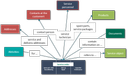
Relations between a service order and other objects