Using FAQs in service

Overview

FAQs are – next to the trouble catalog – the knowledge database for service. They record the experiences of your employees and thus facilitate problem solving and the preliminary evaluation of service measures.

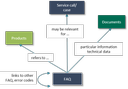
FAQs usually refer to an individual product, but can also apply to all products. FAQs can be classified, tagged with keywords and include links to other FAQs or trouble code entries. Any document or media file can be associated with every FAQ entry. In a service call, you can quickly determine and attach FAQs rele­vant to the call.

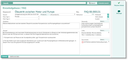
FAQ form with advanced search options. The entered FAQ refers to a product, is linked to other FAQs and refers to a relevant document.

Important properties and features of the FAQ database:

  • Release of FAQs by designated release persons
  • Simple and advanced search directly in the FAQ form
  • Optional keyword search and search for similar terms
  • Automatic assignment of keywords, optimized by editable blacklists and whitelists
  • Classification of FAQs with type attributes
  • Assignment of relevant documents and links to other FAQs and trouble codes
  • Automatic determination of relevant FAQs for the service call by analysis of the product assignment and the stored descriptions
  • Assignment of relevant FAQs to the service call, including evaluation
  • Display of additional administrative data
  • Formatted text can be entered in the Answer (CLOB) field. To edit formatted text, you can open and close the editor toolbar with [Ctrl + Alt + T].

Relations to other objects

Relations between FAQs and other objects