The trouble catalog is - next to the FAQs - the knowledge database for the service. It simplifies the trouble diagnosis, the problem solving and the preceding evaluation of missions. While FAQs are suited to deposit the experiences of your staff members in the system, you are enabled to localize and find solutions for the elimination of troubles through the access to - mostly product-related - trouble codes.

Using trouble codes in service
Overview
Relations to other objects
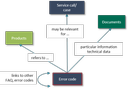
Relations between trouble codes and other objects
The trouble codes saved in the catalog mostly refer to one product but can also apply to all products. Trouble codes summarize information about the trouble area, trouble type, and how to fix the issue. They can be given with keywords and may contain links to other trouble codes or FAQ entries. Any documents or media files can be associated with every entry. In a service call you can quickly determine trouble codes relevant to the call and save them.
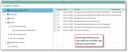
Tree view of the trouble catalog. Through the selection of a plant, a trouble area and a trouble type one gets straight to the solution description.
Important properties and features of the trouble catalog are:
- Trouble codes summarize information about trouble area, trouble type and measures for removing the trouble.
- Alternative display of trouble codes as a list or trouble tree
- The assignment of trouble codes to products is possible but not required.
- Quick identification of the trouble area and trouble type when capturing service calls by searching the product-related trouble tree.
- Quick determination of the trouble removal options with the help of the trouble tree while a call is being handled or service missions are being prepared.
- Analyses can often determine affected products or frequently occurring errors. For example, the quality of your own products or the products of suppliers can be assessed.
Trouble catalogs are typically provided by technical departments or suppliers and can be imported to the CRM, e.g., by a CSV import.