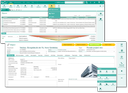
Property overview and management

Property management

Via the Sales/Properties top menu, you can open the object overview, the management of the property list as well as the management of crafts.

The attributes of the property management allow you to manage the relevant information for your construction projects and the contacts and cases involved. In detail:

  • Unique property or project number (ibau code).
  • Keeping an eye on the key contacts, and property-specific management of all involved contact persons and competitors as well as a person responsible.
  • Status-driven object workflow.
  • Kalendar for managing object-related appontments.
  • Management of different property types (e.g. public or private projects).
  • Core information (building phase, bid type, origin, start of bidding phase, submission deadline, contract award date, building start and completion dates, budget, anticipated revenue, etc.).
  • Technical details, trades, sub-properties, delivery items and services.
  • Property-specific activity history, document management, feature list.
  • Automated follow-up and escalation management (deadlines).
  • Overview of all business opportunities, quotes, and contracts associated with a particular property.
  • Processing and managing all kinds of addresses (e.g. place of execution, delivery address, bill­ing address) in the Master data or Addresses tab, respectively.
  • Individually definable property assessment attributes, description of the property or project.
  • Radius search for properties in the Extras menu.
  • Radius search (for addresses or locations, e.g., for sourcing suitable service providers in proximity to a property using freely definable filters).
  • Comprehensive filtering options for property and relationship data.
  • A flag to mark a reference property.
  • Duplicate removal for properties (function bar).

Three-tier sales operations

The system supports you with identifying non-purchasing parties (such as developers or general contractors), opinion makers (e.g. planners and architects), and purchasing customers (dealers, processors, and cus­tomers, etc.), and to gain better knowledge of their particulars. You will be able to immediately pinpoint those parties who consistently do a good job in their respective field of operation, which manufacturers issue invitations to bid, and who the contracts are awarded to.

The import of tender and object data (e.g. ibau) with a powerful duplicate check as well as comprehensive filter options supports procurement, segmentation and qualification.

ibau interface

JustRelate CRM combines CRM functionality with information in ibau, providing integrated sales support of selected projects in ibau.

  • Configurable ibau data import,
  • high-performance duplicate checks for property data,
  • threshold values for recognizing duplicates can be set easily,
  • the property name, ibau number, location, etc., are checked.

Imported properties in the CRM receive their ibau number and can be qualified or tracked in ibau using the Open in ibau function from the CRM. Changes can then be imported manually or via the CRM job.

Property list

Here you can see the list of all construction projects in the database. Using quick filters, you can restrict the list when needed to My properties or to Open or Completed properties. Of course, you can also use all the standard features of the system for searching and filtering the list.

In the bottom region, a compact key figure analysis is presented that is based on the property status.

Right out of the list, you can open one or more properties in the property form via hyperlinks.

Property

The form contains the most relevant attributes for managing a construction project, as well as all important relationships.

Master data

Meaning

Keyword

Any input, identifies the record across the CRM

Number

Property number that must be unique

Building owner

Click the button to select a contact

Status

Adapted statuses, or status of the ibau interface

Dealer

Click the button to select a contact

Building developer

Click the button to select a contact

Planner

Click the button to select a contact

Responsible

Usually the creator of the record

Type

Type for different kinds of building projects such as "Public project" or "Private project", etc. The types are managed by the administrator.

Recorded on

Date set automatically when the property was added to the database. You can change this date.

Indicators

Basic characteristic numbers. Choose a defined entry.

Scheduling

Dates for planing and tracking. Set the desired dates.

Revenue

Available budget and expected revenue. Enter decimal values.

Language

If needed, select the language for the project and for customer communication.

Main address

Main address of the property. Further addresses can be managed in the Addresses tab.

You can assign an image to the property or construction project as needed using the functions in the function bar.

The most important relations

In the sublists (tab) of the property form, you can manage all important relations of the building project.

Subordinate objects

You can assign objects from the database that are related to the building project.

Contacts

Integrate all involved contacts with their Role.

Activities

Any activities across all channels that have to do with the building project (tasks, appointments, com­munications). Use the Quick Filter for quickly viewing the list. Create new activities via the toolbar directly at the prop­erty.

Documents

Central storage of various documents for building projects that are maintained in the document management and are assigned and linked here.

Addresses

Here you can enter addresses that are important for the object. The location address of the property must always be cre­ated as the main address (tab Addresses). The addresses can appear, for example, in Google Maps (highlight, click location icon).

Sales

Overview list of business opportunities, quotes and orders in total and at property level. Link this building project to sales cases or projects managed in the CRM, e.g., to also realize corresponding evaluations. Exclude individual business opportunities or quotes from the forecast.

Collaboration

Collaboration platform, as in all case forms to allow all internal employees who are involved in the project, or associated with it, to follow the processes and progress of the project immediately. The collaboration can be initiated and managed via the CRM Pinboard.

In addition to the standard overview and key relationships, the property template can provide further possibilities to create relations. Here are some examples.

Technical details

Free input of additional information.

Crafts

Linking with crafts in the database. You can manage the crafts also via the Sales/Proper­ties menu.

Services

This is for specifying the scope of supply for the property. The scope of supply listed here could be used for sales cases like quotes.

Trace back

You can assign to each property its origin and successor cases and track them.

Duplicate resolving for properties

Like with contact duplicates, there is a cleanup feature for removing property duplicates from the system. The submenu provides the Find duplicates and Merge duplicates functions. Both open the duplicate evaluation dialog that includes threshold setting controls and attribute evaluation.

Merge duplicates finds the record to be merged with, and the comparison dialog can then be used for merging the objects.