
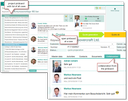
There are several ways to open the pinboard:
- Globally via the Sales/Projects/Case pinboard menu item. In the keyword of the pinboard overview, you can search for cases. The "News" filter (cases I am following, and whose pinboard has changed in the past three days) can be used to view current pinboard posts or pinboards from which posts have been deleted.
