System preferences in the comfort list

You can easily find, check, and change the CRM system settings (server variables). Administrators can manage global, group and user-specific server settings not only in the PiSA cubes resource lists but also in the setting dialogs from the Administration/Settings... menu.

As a user, you can access your settings under My data/Configuration/My settings and can modify, reset or delete them easily.
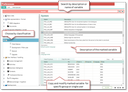
Functional range of the  system settings

  • Type and subtype management
  • Classification of settings by type and subtype
  • Find settings quickly due to tree representation and full-text search
  • Predefine group and user settings, inspect, compare to default settings, and reset
  • Integrated description of the settings

Comfortably setting or adjusting environment variables

Notes for upgrading and customizing

After an upgrade, the variable list is automatically updated. The client-specific variables already con­tained in the system are adopted. They automatically get the Other type and the Administra­tion flag. The entries need to be checked after the upgrade, and, if necessary, the admin flag should be removed, and a different classification should be chosen.

Note: Variables marked with the "Administration" flag are only visible to the "Preferences administration" members. These are the members of those groups whose group identification codes are listed in the value of the PSA_ENV_ADM_GIC environment variable (comma separated, default value: "43").

New variables can be created in the Administration/Preferences/Preferences administrator list on the List tab, and be documented in several languages (description, values).

Afterwards, in the Administration/Preferences/Administration administrator list, execute the Refresh function. The default type is Other. Here you can classify new variables (type, subtype, administrator flag).

If required, group- and user-specific copies can be created in the Administration/Preferences administrator list on the Tree tab.

Classification of the environment variables

The classification of the environment variables the administrator and the users can find in the tree struc­ture of the system settings can be managed via the Administration/Preferences/Types form.

Each type represents a record with subtypes to which variables are assigned.

Here you can create new types (nodes) for the classification tree with subordinated subtypes. Pay atten­tion, to the uniqueness of the identifier. In many lists, the identifier is automatically preset on creation from the data object. Identifiers are anchored in the record.

Attention

Attention: It is not recommended to change the classification delivered by the standard.