The Activity/Correspondence function lets you quickly and easily create correspondences in the form of written documents and emails. The assigned contacts are used as addressees, if desired. Incoming emails and letters are also managed as correspondences, so you can monitor them.

Creating a sales correspondence
Recipient flag
In the contact list of a case, you can specify a case contact as an addressee of correspondences (email, letter). Mark the Recipient field for this purpose. The system checks whether contacts have such a recipient flag in the contact relation. Then these are automatically associated as a recipient. Thus, a "case contact" is always automatically used for quotes documents, emails etc.
Note: If one of the contacts with the recipient flag set is a team or a distribution list, it is recursively resolved into its members. Companies and departments are addressed here, but not resolved into their employees.
If several contacts are marked as recipients, they are used in the emails as individual recipients, but the quotes document uses only one contact as an addressee.
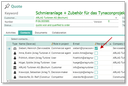
Recipient flag at a quote
See also: Activities and Tasks, Tips when creating a correspondence