As with all records that have addresses, geo integration is also available for service objects.

Showing service objects on a map
Location and GPS coordinates
A service object usually has a location at which, e.g., the servicing is performed. This not necessarily needs to be the location of the customer or operator, but rather is the location of the system or machine where service actions for repair, installation, etc., take place.
At the service object, the Show on map function presents the location address of the service object on a map if the service object has an address. The address can be maintained in the Location tab. It is accessed for map display and radius search.
In the Location tab, there is an input dialog (Enter coordinates) available for recording geo coordinates manually, including conversion into the various forms of presentation. The system checks whether the resulting latitude and longitude are “valid”.
The coordinates can be determined, e.g. in Google Maps, after locating an address using the "What's here" function from the context menu of the map. A JustRelate CRM document can also be a source of the coordinates of a service object.
From the customer installation
Service objects (top objects without customer preselection) can be displayed independently on a map (MapQuest Open with Leaflet plugins) using of service object filters.
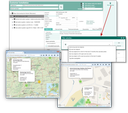
Map representation of service objects of the customer installation

Attention: These independent filters do not refer to the currently selected customer installation.
The “Show on map” function lets you select a predefined or your own filter. In the CRM standard, the exemplary filters shown above are provided.
A service object is displayed on the map as a colored pin. At the pin, further data like the designation of the service object, location addresses, customer, installation or acceptance are displayed as the mouse hovers over it. Several service objects in the same location are visualized as a colored spider pin (in the picture, e.g., orange) displaying the number of service objects. When clicked, the spider pin falls apart into the individual service object locations.