In the master forms of process-related objects (as for example companies, in sales cases or appointments), there is a status bar in which statuses of the loaded record can be displayed as icons.

Status monitoring in forms
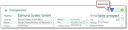
Company form with status bar
The status bar allows you to
- analyze and aggregate the data in the system (maybe having been maintained for years),
- derive statuses from them, and
- visualize those for various objects like the company or a case.
This enables you to immediately recognize, for example, critical conditions and act accordingly.
Standard elements in the status bar
In the CRM standard, the following statuses are monitored and visualized in the status bar.
Company

History
The company has predecessors, successors or both.

In the pipeline
The company has open opportunities or quotes.

In marketing
The company has open marketing actions.

Only competitors, competition situation
The competitor has generated more, the same or less turnover compared to us.
Person
History
The person has predecessors, successors or both.
In marketing
The person has open marketing actions.
Sales and service cases

Escalated activities
The case has escalated activities.

Turnover
The turnover of this case is < X, is between X and Y or is > Y.

No contact since
In the case, there has not been any customer contact (phone call, appointment, letter ...) for X days.
Service calls
Escalated activities
The service call has escalated activities.

Escalation
The service call no or one escalation level (is open for 5, 10, 20 days).
Marketing
Escalated activities
The case call has escalated activities.
The statuses per master record are determined with the help of a job and are placed in additional fields of contacts and cases. Which statuses are determined and symbolized by means of which methods is defined in an advanced escalation table in the respective process. This makes it possible to monitor other statuses, e.g., for every group (customer, supplier, …) or for every case type.
Incorporating individual elements into the status bar
You can define new or your own status bar elements in the escalation table of the process definition.

Admin: Further elements can only be implemented by a customizer or an administrator with knowledge of the CRM data model. For this, the escalation table has been extended. The functionality of the existing escalation implementation remains.
See also: Remarks on the escalation management

Attention: In the standard, the CRM does not include an escalation definition because it would depend on various functions (e.g. the job SVC_OPN_TIM). Old escalations, e.g., for a service call can be realized using the "field value" method. The field is ESC_LEV, and the query condition then is 1, 2, 3 ... In the standard, only the status bar definitions corresponding to the extended escalation table are included.