Drill down

In the Drill-down module (Drill down center), data can be compressed in several steps in the customer, project and product dimensions. This allows analyses, e.g., of the order value of products of specific product lines of specific customers. The defined search paths, including the compressions, can be saved and accessed under a name. The results are displayed in a table of facts from which particular fields can be selected and presented in a list element of the cockpit. The analyses are performed by a recurring job (usually daily) to show the Drill down based on current data. Without a lot of post-processing, you can use the drill-down result,

  • to select target groups in ad hoc lists,
  • to display a list or a bar chart in the cockpit, as well as
  • for any follow-up processes from the master data management.
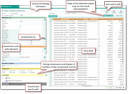
Multileveled data compression across three dimensions

The Drill-down center offers:

  • A search across the “Cases” → “Customer” → “Product” dimensions.
  • Easy definition of search paths, and extensive possibilities to compress, also time-based.
  • Saving and reusing search paths.
  • Displaying the result set in the table of facts.
  • Arranging fields individually in the table of facts.
  • Presenting the table of facts with the desired fields as a list or a graphic element in the cockpit.
  • Automatic refresh of the table of facts by a recurring job (usually daily).

Invoices table

In the JustRelate CRM system, you can access an invoices table (Administration/Invoices menu). Invoice data from external systems (e.g. ERP) can be imported or written into the table either via a REST interface or using a function from CRM orders.

Invoices table

Invoices have a structure similar to orders. They consist of an invoice header and invoice items. The latter are managed in a flat table. They can be structured by the item number, and can contain references to neutral articles. Such references are necessary for evaluating products.

Info

Admin: The “Invoice import” REST service is available for populating the table from external systems (Development/Cubes/Web services menu).

If the table is populated from orders using a function, a discount assigned at the order header is shared between the invoice items.

Invoice data as source for drill-down evaluations

The drill-down center can obtain and process data from the invoices table and thus also enable sales reporting in the trend center. In a drill-down, you can select invoices as the data source in the “case” dimension, filter them for invoice data, and compress them. For this, you will find an “artificial” “invoices” process in the process selection and the “Invoice date” and “Due date” date fields in the filter area.