Evaluating a questionnaire

Views on the answer table

If a questionnaire was filled out, the answers are stored in the questionnaire and in the respective object. All answers of a questionnaire are stored in a global answer table. Depending on the scenario, the table contains references to the following:

  • Questionnaire
  • Question
  • Marketing action
  • Contact
  • Activity (appointment, phone call).

 Example:
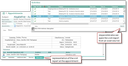
Readable visit report from a questionnaire in the appointment

The following views of the answer table are available for analyzing the answers.

In the questionnaire itself:
List of the answers per contact (Answers or Answers per contact tab).

In the person and in the company:
List of the answers per questionnaire (Additional data/Questionnaires tab)

In the marketing action:
List of the answers per questionnaire and contact (Questionnaires/Answers or Answers per contact subform)

In the phone call:
List of the answers per questionnaire (Questionnaire answers subform)

In the neutral question (Administration/Questionnaires/Neutral questions):
List of all answers across all questionnaires, marketing actions and contacts

In the appointment:
List of the answers of the visit report (Visit report subform) or visit report as a created report.