- Generation of emails for requesting consent
- Services for recording the consent given via dynamic, customer-specific websites.
- Questionnaire extensions for recording consent via the CRM apps, e.g., for lead generation at trade fairs (trade fair app, visit report app)

Process for obtaining consent
See also: GDPR functions of persons
Consent as the legal basis
If no legal basis for storing and processing personal data can be derived from a company's business model, the consent of the data subject concerned must be obtained.
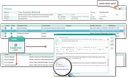
Request for consent
In the status bar of the person form, a paragraph symbol is displayed in different colors:
- § (green): All purposes of use have a valid legal basis
- § (yellow): At least one purpose of use is not valid
- § (red): No purpose of use has a valid legal basis
Consent email
One form of electronic consent is that of accessing a personalized website with the data protection settings of the data subject. The person is sent a personalized email containing an explanatory text and a hyperlink to the corresponding website.
For this purpose, persons have the Consent email (new) function in the GDPR submenu for submitting a new email using the “E-Mail: GDPR Consent (German, BIRT)” template [PSA_RPT_CPD_EML_DPR_CNS]. By means of the PSA_DPR_RPT_EMA environment variable, the template to be used as a default can be changed.
The most important part of the email text is the personalized hyperlink to the data protection settings. The base URL for this hyperlink is stored in the environment variable PSA_DPR_RST_SVC_URL.
When the consent email is created, a log entry, “Consent requested”, is added to the person in all purposes of use with 'Web option', and the email is linked as an activity.
When consent emails are generated, a check is made to see if consent emails already exist. This feature helps prevent people from receiving multiple consent emails, especially in scenarios where a consent process is in progress or where independent teams are working on the same contact data stock.
This feature (of distribution lists, marketing operations, serial emails, appointments, phone calls, persons) scans purpose logs for each recipient for "consent requested" entries with an associated activity. If there is at least one such entry, a wizard opens. It contains a list of recipients who have already received a consent email (as well as the email itself) and information about when the last email was sent. Via a checkbox, you can deselect the recipients in the list who should not receive a new consent email. After confirming in the wizard, the consent email is created for the remaining recipients and displayed.
Documentation of consent
Consent or withdrawal via personalized website
JustRelate CRM provides a web service [PSA_DPR_SVC] for supplying a personalized website with the necessary data, which uses a GET method to deliver the name of the person concerned and their purposes of use with the “web” property. The current status of the Active flags is also output. The call expects the internal key (PSC_GID) of the person as a parameter.

Admin: This website must, of course, be accessible from anywhere and visualize this information itself. JustRelate CRM delivers a sample page you can use as a basis for your own pages.
The web service offers a POST method for writing back the changed (or unchanged) data protection settings. In addition to the person key and the key of the call mail, the confirmed and unconfirmed purposes of use are forwarded separately and stored directly for the person. Each call to this method results in a log entry for the respective purposes of use, and if the “calling” email is transferred, a link to it is also made.
An automatic confirmation email can also be sent if a template has been stored in the PSA_RPT_RST_DPR_EMA. environment variable. The standard template for this is PSA_RPT_EMA_RST_DPR_BRT. For tests, the variable PSA_RPT_RST_DPR_EMA_FLT can be used to store an email filter as a whitelist, containing domains to which emails may only be sent.
The environment variable PSA_DPR_RST_SVC_SSN_USR can be used to set the login name of the CRM user under which the web service runs in the system. The user in question must have the necessary permissions for the web service.
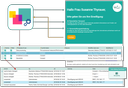
Documentation of the consent
Consent by questionnaire
With JustRelate CRM, information is freuently captured using questionnaires. The GDPR questionnaire Add purpose of use allows you to assign purposes of use to persons. The configuration of the questionnaire allows selecting the purpose of use, the legal basis and the source. You can also specify whether the purpose of use is to be activated immediately or not. As is common practice, this action can be initiated for a questionnaire response through various checks.
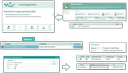
Consent via questionnaire
This procedure is suitable, for example, for recording trade fair leads via the trade fair assistant. After completing the questionnaire, the person in the answer will be assigned a purpose of use, legal basis and source, and the Active property will be set as required. In addition, a log entry is made to prove the action, which is also linked to an activity, e.g., the date from the trade fair assistant.
Note: Capturing the purposes of use by questionnaires does not yet offer any legal certainty, as the corresponding proof of voluntariness is missing. An additionally obtained declaration or signature would be helpful here. If the Fair lead app is used for capturing, it offers the option of recording a signature directly on the pad, which is included in the final report. This report should be stored in the appointment and can then be accessed directly via the linked activity.
Further consents or withdrawals
It may happen that individuals send their consent or revocation by email or fax, or give their approval or rejection by phone. In order to have a documentation possibility in these cases as well, a corresponding activity must be available. If the intended use is now changed manually, a log entry is automatically made. This can now be assigned to the present activity and thus the decision of the person concerned can be logged.
Check consent
This function checks the permissibility of using contacts or addresses (unsolicited advertising).
The Check consent function checks various contact lists (appointment participants, marketing processes, mailing lists, email series, etc.) for active (agreed) purposes of use and warns you not to send unwanted advertising.
The function checks the purposes of use only for personal contacts that are actually subject to the GDPR (persons from non-EU countries are not subject to the GDPR). The country of the main address is relevant for this.
For this purpose, there is the Data protection relevant flag in the country table (Administration/Contacts/Countries) that is set in the standard for all European countries. Persons without a main address or without a specified country are considered to be relevant for the GDPR for security reasons.
This flag is also evaluated for the status bar and results in an extra status with a black privacy icon (level 3) if the person is not GDPR relevant. Adding uses to a non-GDPR-relevant person is still allowed.