Every person has the right to “be forgotten”, i.e. to have their personal data deleted upon request to the processor. However, the General Data Protection Regulation also requires the restriction of further processing of personal data in other situations. In addition to the request for deletion, the objection of a data subject, but also the expiry of a retention period, is sufficient to delete or block the data.

Deleting personal data
Multilevel deleting
In a CRM system, deleting a person directly is not recommended due to the potentially massive linking, as the resulting loss of data could be enormous. Instead, the person concerned should be marked as “deleted”.
In essence, this marking is carried out using the Deleted according to GDPR status in all groups of persons. For this, there are several statuses in the processes of the persons with an identifier following the pattern [PSA_PRS_???_DPR_DEL]. This status is provided with a check function that only allows certain users or groups to execute it. The account manager or the PiSA cubes administrators and special groups can be allowed to run the function via parameters.
GDPR function “Delete person data”
The special GDPR Delete person data function is available on the person form. This function provides a query dialog with three options for the different “deletion depths”, which can also remove data irreversibly from the person.
Note: For this reason, this function is only available for the “Administrator” and “Contact Administrator” profile groups. In addition, it is of course possible to completely remove the data using the “Delete data record” standard function, with possible consequences for data loss.
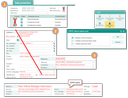
Multilevel deleting
Level 1: Disable communication
The status of the person is changed to Deleted according to GDPR, and the associated action function is executed (see “For info” below).
Level 2: Delete communication data (+)
In addition to the changes in level 1, the communication data of the person is now also deleted, if available the bank data and of course the telephone log. If a date of birth is present, it will be removed as well. If the person is included in mailing lists, these assignments are deleted.
The person's email addresses are not completely deleted, but converted into an encrypted text in order to be able to recognize a possible re-entry of the deleted person (email blacklist).
Level 3: Delete personal data (+)
At this level, the last personal information such as position, department and occasion is removed. The name is anonymised to make any inference about a real person impossible.
The job for automatic deleting [PSA_DPR_DEL_JOB] can be configured to call level 2 or level 3. The removal of contact information is logged in the server log file for security reasons.
The Deleted according to GDPR status runs an action function that helps to prevent all communication by setting the mail lock and the email series lock. All assigned processing purposes are set to inactive, and a corresponding log entry is made. If the “Valid until” date is still in the future, it will be changed to the current day. Furthermore, there is the default behaviour for inactive contacts, where records are displayed in red and access is restricted.
Deletion confirmation
In order to support the request, it makes sense to store the corresponding response templates in the CRM. In the standard, the template named “E-Mail: GDPR deletion confirmation pursuant to Section 19 (German, BIRT)”. The modified template serves to confirm the deletion to the person. At the same time, it should be pointed out that there is no proof of the identity of the person in the system, i.e., no proof of deletion because this would require a reference person.
Automatic marking
Note: In the following case, of course, no deletion confirmation to the person is required since no request has been made.
Optionally, the use of a time-controlled function is possible [Job: PSA_DPR_DEL_JOB], which regularly checks the validity date of all contacts and automatically sets this status as soon as it is in the past, thus deactivating it for communication.
Identifying a person already deleted according to GDPR when capturing – email blacklist
JustRelate CRM logs the fact that a person has been deleted in a “blacklist” that contains the encrypted email addresses of deleted and thus anonymized persons.
The deletion of person data from deletion level 2 described above does not completely remove the email addresses from the master data, but replaces them with an encrypted value. The original address can no longer be determined from this, but comparing it with other encrypted addresses is possible.
Duplicate check for the “Deleted according to GDPR” status.
As part of the automatic duplicate check when importing persons, the system checks them against the “email blacklist” mentioned above and warns if a person with this email address who has already been deleted is to be created again, for example from another channel (import).
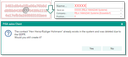
E-mail blacklist
You now have the option to create the person again [Yes] or to skip the import of this person [No]. If the query was answered with “Yes”, the regular import of the data will take place. In addition, the CRM will create in the background a history link to the person already marked as deleted. It is thus possible to view the development of the purposes of use via the data protection tab of the person.
Perform a manual duplicate check

Attention: A person who has already been deleted at level 3 in accordance with the GDPR can only be identified by a manual duplicate check.
Therefore, you should always use the Duplicate check function if you have created a person in the person form without an automatic duplicate notification having been displayed.
How to proceed when creating persons already deleted
If a person who has already been deleted is detected during import or manual capturing, always check whether
- capturing the person again stands in the way of the deletion request (for example, time period of deletion),
- the person is making a “test” to check if they are really deleted,
- the person would expressly like to be captured again despite their deletion request.
The legal basis for re-importing or creating the person must always be clarified and, if necessary, agreed with the data protection officer. If there is no clear legal basis, the person may not be imported or created.
If you capture the person again, it is necessary to proceed in compliance with the GDPR (consent, etc.) as with a new contact. The legal basis must be clarified clearly or creatively with the person at the latest when contacting them on the basis of Art. 6 GDPR (lawfulness of processing).