Mailings

With Automations, every mailing is basically made up of an email template, a recipient list, and several settings required for properly dispatching the emails, e.g., the sender’s address.

An email template usually includes linked elements the recipients can click on. The actions the recipients finally take are recorded to enable the marketing or sales team to measure the effectiveness of a mailing and draw conclusions from the results in order to initiate follow-up measures. Email templates can be created using the Web Builder or JustRelate Email Builder. See Providing an E-Mail Template for details.
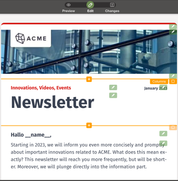
Creating an email template is as easy as putting a web page together using widgets as building blocks, e.g., images, headlines, text boxes, buttons, etc. With textual content, you have placeholders available that are automatically filled in from the recipient list as Automations finally generates the individual emails and dispatches them. Next to a recipient’s email address, their name, company, phone number, etc., as well as custom fields can be provided via the recipient list and inserted into the template for personalization purposes.

Mailings can also be created via JustRelate CRM by adding recipients to a serial email you can then pass to Automations. For such integrations, Automations features an API, meaning that Automations can be made available in any application environment. Furthermore, Automations accepts recipient lists in the form of CSV files. CSV (comma-separated values) is a text-based format for transferring table-like data from one system to another, so you can alternatively maintain your recipients with the help of a spreadsheet application that allows you to export your data as CSV.