
Automations features a templating language that allows you to personalize emails more detailed. It is based on the Golang templating language and can be used in email templates that were created with JustRelate’s Email Builder.
Templating Language
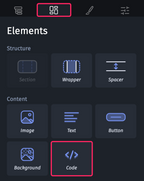
For customization purposes, the Email Builder includes a “Code” element you can add directly to the design space of your email. To learn more about this element, please refer to the article about Code in the Email Builder documentation.
The templating language of Automations gives you access to any recipient’s data fields such as __email__ or __name__. Using conditional statements, you can, for example, check whether a field is set or not, and, depending on the result, have the field contents or a suitable text fragment inserted into the template.
Syntax elements
Delimiters
Automations recognizes and processes template language actions or statements that are enclosed in delimiter pairs, {{ at the start, and }} at the end, optionally followed or, respectively, preceded by a space character:
{{ action }} {{action}}Comments
A comment is a special action you can use to indicate the purpose of your code, for example. Comments start with /* directly following the left delimiter, and end with */ directly preceding the right delimiter:
{{ /* this is a comment */ }}Variables
Variables are for storing values that you want to access multiple times later. Here’s how to create a variable and output its value:
{{ $myVar := "Hello!" }}
{{ /* other code */ }}
{{ $myVar }}
Conditions
if
The following example of a simple if condition checks whether the __name__ field is set or not. If it is set, the recipient is addressed with their name:
{{ if .__name__ }}
Hello {{ .__name__ }}
{{ end }}
Assuming that the recipient’s name is “Poirot”, the string “Hello Poirot” is output.
Else if
For nesting conditions, the else if statement is available:
 {{ if .__name__ }}
Hello {{ .__name__ }}
 {{ else if .__given_name__ }}
Hello {{ .__given_name__ }}
 {{ end }}
Here’a a fully fledged example that uses the if and else if statements and an and clause. If __salutation_ as well as __name__ are set, the recipient is addressed with their salutation and their name. If only the name is set, they will be addressed only with their name. In case none of these fields is set, a neutral greeting is inserted.
 {{ if and .__salutation__ .__name__ }}
Hello {{ .__salutation__ }} {{ .__name__ }}
 {{ else if .__name__ }}
Hello {{ .__name__ }}
 {{ else }}
Dear customer!
 {{ end }}
Ranges
The range action iterates collections like arrays or maps, allowing you to process each of its elements. This is required for having lists rendered dynamically. The list function Automations provides lets you create such collections. In the example below, a list with three items is created and then iterated to output the items one after the other using {{.}}.
 {{ $myVar := list "a" "b" "c" }}
 {{ range $myVar }}
Value: {{.}}
 {{ end }}