Contacting support

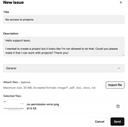
Do you have a question, or did you encounter a problem with one of your JustRelate products? If so, you can “Report an issue” from within Home via the  menu at the top right. This opens a form for creating a support ticket.

First, please give your ticket a meaningful title, then describe the problem, and select a product or category (such as “Email Builder” or “General”).
To help our support team understand the issue and assist you promptly, please describe it in as much detail as possible and, if applicable, you may also want to provide a screenshot or other relevant documents for illustration. You can use the “Import file” option to upload your attachments.

Finally, click “Send” at the bottom to submit your message and create a support ticket. You will then be sent a confirmation email for your request.

Managing your tickets

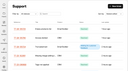
To get an overview of the tickets you’ve created over time, select “Support” from the  menu. In order to narrow down the list to the relevant tickets, you can use the elements above the list and filter the tickets by their status, search for tickets, and sort them alphabetically or by the date they were changed. You can also create a support ticket from here.

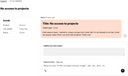
Every ticket has a reference ID in the leftmost column of the list. Click a ticket’s ID to open the details view where you can check the ticket status, or submit additional information: