You can access the “Profile” area via the menu that opens after clicking the avatar button in the top right corner.

Your Profile
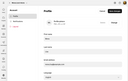
“Profile” page

Your profile settings are applied to all JustRelate services you are using, i.e., also to the Email Builder and the Web Builder, for example.
Your can add a picture to your profile if you wish. For this, click the “Change” button to the right to upload the picture you want to be used.
Furthermore, you can change your name, your email address, and your preferred language. Click “Save changes” at the top right to apply the changes you made.