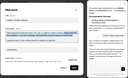
If you’ve asked Coworker for assistance, but its response doesn’t work out, or if you’re hesitant to ask it a question, you can have the assistant prepare a ticket for you, simply by requesting it to do so. It then opens the “Report an issue” form (which is also accessible via the  button in the top bar) and fills in the details known so far, i.e., the ticket title, the description, and the product concerned. In the description, missing details show up as placeholders, e.g., “[Please describe what happened …]”.
Coworker then prompts you to specify the missing pieces, one after the other, and updates the form accordingly. In this process, you can still edit the form contents, however, it is recommended to let Coworker complete its task before stepping in. The conversation panel will also remain functional while the form content is being finalized. However, you cannot access any other functionality on the rest of the page while the form is displayed.
Finally, check the ticket – you can ask Coworker to rewrite the description if you wish –, add helpful screenshots or documents using the “Import file” button as needed, and click “Send”.

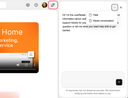
 button in the top right corner. A panel then slides in from the right side of the current page, revealing a text input box with a submit button at the bottom, and an “X” button at the top right for closing the panel, which you can also achieve by clicking the Coworker button once again.