Assets are images or collections of images for use in the Email Builder. Like projects, they can be organized using folders.

Assets
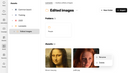
Like with the "Modules" area, you can create folders for organizing your images by whichever criteria you find helpful. "Assets", too, has a tree view on the left-hand side representing the projects that have been created so far, and to which you have access. Your assets are always clearly assigned to a project.
Your collection of assets constitutes your media library from which you can insert images into your emails using "Image" elements.
To upload images to your project-specific media library, click the "Import" button at the top right, and select the desired images via the selection dialog of your operating system.
Every asset in your media library has a "More" menu allowing you to rename or delete the image concerned.

Media deleted from the media library cannot be restored.