Email marketing increasingly relies on interactive and engaging content to capture the users’ attention. Embedding videos in emails is a great way to improve engagement, convey complex messages in a simple way, and make communications more engaging. However, some email clients don’t natively support video playback or block this feature for security and compatibility reasons (like Outlook or Gmail).

Videos
To get around this, replacement content can take over and make the user experience as seamless as possible.
Adding a video element
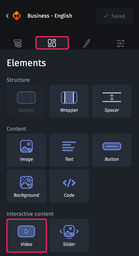
In the “Elements” tab  of the design pane, the “Video” element lets you drop a video into the section or group you want.
Customizing a video element
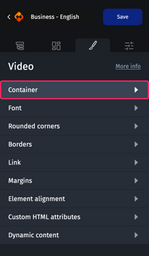
From the conception pane: "Styles" tab represented by the (Brush) icon, click on "Container" category to configure your video element with:
Step 1: Add the poster
This is a preview image of the video (a screenshot of the video with a play button for example) which will be displayed when the email is opened.
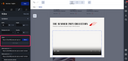
Step 2: Enter the video URL
It is required to host the video on an external server in order to present it in your emails. The mp4 format is sufficient (and now as compatible as the webm format; it is no longer necessary to have both formats).

The vimeo tool allows you to host and generate a URL for your video in the right format for the emails.
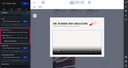
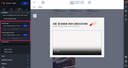
Step 3: Configure replacement content
- Fallback image: You should configure a fallback (or replacement) image (.PNG or .JPEG) which will take over from all other email and webmail clients not compatible with video innovation. It is possible to keep the same image as the poster or an animated image (.GIF). This allows you to simulate video playback while remaining compatible with the majority of email clients.
- Fallback image for Outlook: Some previous versions of Outlook do not read the Gif, it is advisable here to favor jpeg or png images which will take over on the versions concerned.
Step 4: Configure a link
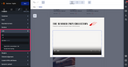
This only applies to replacement content and allows the recipients to view the video or a landing page by clicking.
Test video compatibility
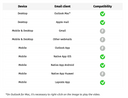
You will find below the webmail and email client compatibility table.
In the case of incompatibility, the fallback content that you configured in step 3 takes over so that content is always displayed.
Video hosting
You will need to set up a hosting server (HTTPS, imperatively) where you can host your video files.
You must specify MIME types in a “.htaccess” file. This file can be placed at the root of the server, or in the folder containing the videos. Add this to your “.htaccess” file:
AddType video/mp4 .mp4 .m4v

Depending on how frequently the video is opened, the load represented by your video email can be quite significant. Your server must be stable enough to handle it.
Compressing and encoding videos
There are three recommended software applications for converting videos to the required formats, with a compatible size and the capacity to stream inside the email:
- MiroVideoConverter is a very intuitive tool for resizing videos, customizing the height/width ratio, changing the file format, etc.
- VLC is known for its many options for converting and for adjusting the quality.
- For the greatest ease with the command line, FFmpeg is a complete solution. The command for encoding videos with this software is:
client:~$ ffmpeg -i ma_video.avi -vcodec libx264 ma_video.mp4
Good to know
Does a video increase the weight of the email?
Integrating videos into emails does not add weight to the HTML code, because the videos are not directly integrated, but streamed from an external source.
Which “weight” may videos have?
In an email, the video will be available in streaming format. This means that it doesn’t need to be fully downloaded in order to begin viewing it. So, theoretically, there is no restriction on the video size.
Nevertheless, it is strongly advisable to keep an eye on it! Particularly considering that you are aiming for a smooth, fast streaming experience especially for the mobile users.
Adapting the resolution of a video
- In the desktop version of the email, adjust the size of the video to the actual surface area available on mobile.
- Limit the image quality to the bare minimum needed.
- Limit the bit rate (expressed in kpbs).
Also, feel free to test out the display speed as well as the quality of your video under real-life conditions (using a 3G connection, for example).