If you assign external contacts to a marketing action in which attendee statuses (milestones) are defined (telemarketing or event), the assignment of an attendee status from the marketing action concerned is offered when you create and modify activities to this contact. Also, when saving the activity, the marketing action assignment is queried.

Attendee status and feedback
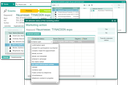
Attendee status query with assigned projects or cases

Admin: The automatic query of the attendee status (milestone) in the action can be switched off via the PSA_HDL_ACT_PRO_CON_STA user variable if desired.
The milestone is also queried when changing the status of the action.
The milestone is linked to the contact and can be evaluated for follow-up operations.
Note: If there is more than one contact involved in the activity or the marketing action, you can transfer a given milestone to other contacts in the list. For this, the Transfer milestone button is available that works like "Transmit content", but only if the field is active. After having specified a milestone for the first contact (without saving), mark any or all contacts and press this button.
Presenting attendee statuses
In the Attendee status tab, you will find a list view and a Diagram view for the marketing actions. It can be displayed using the view selection and shows how often an attendee status has been assigned to external contacts. This gives you a quick overview of the progress of the marketing action. You can also compare target and actual values in the bar chart.
The "Attendee status" cockpit elements are also available. For example, they enable you to control individual business events. If required, the current user can define the element for his (upcoming) "next activity", depending on the preset "process" (activity type). The participant list of the activity selected in the cockpit element is evaluated.
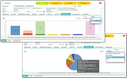
Attendee status diagram
Analyzing attendee status
To create an Excel chart, the Report Manager is available (default print command). Here, select the report "Attendee status (BIRT)" for the textual and graphical presentation of the participant status as a PDF.
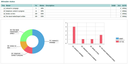
Attendee status in the cockpit
The analysis in the form of a chart shows the part of external contacts with the attendee status, i.e., for example, the contact status in the action and thus its status.