Main status

The main status is used for the sales funnel and for processing sales requests. It is also used for process visualization with progress icons for cases.

It usually summarizes several process statuses specified in the process definition and is presented as a segment by a sales funnel or in the evaluation of a request. For displaying turnover in a sales funnel at the overview lists of sales and service cases (number and turnover of cases in the main acquisition phases of the sales process), a main status is indicated next to the status on the Position line. There are at maximum four positions as progress icons. One position can be assigned to several main statuses, which allows branching.
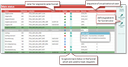
Managing statuses for processes, funnels and requests

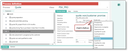
The main statuses are predefined (Administration/Sales cases/Main status or Administration/Ser­vice/Main status) and can be selected at the process status.

Assigning a main status to a process status

Attention

Attention: It is important that the main statuses are the same for sales and service, because otherwise the sales funnel does not work for the sales/service combination.

See also: Sales, Lead management portal

Main status process visualization

Together with the main status, a process bar can be displayed in the header area of a case, so the user can immediately see the main status the case is in. In the standard system, the process bars are available for business opportunities, quotes, orders, all marketing cases and also for service cases.

Service calls

For service calls, there are different main statuses for inquiry and fault, complaint, and complaint 8D, because these processes are fundamentally different. The process bar for an inquiry has only three ele­ments.

Service quote

The main statuses already used for sales quotes are also used as the main statuses for service quotes. This is because they are the data source for the sales funnel in the service and sales case over­view. The "Quote OK" process status has been added to the service quote. It receives the main status "Quote OK".

Service order

The service order statuses of the various PSA_SVC_ORD processes can be mapped to a main status set.

Main status as a progress bar

Info

Admin: The position of the process status in the process definition determines which main status is the initial one per position.

See also: Administration, section "Process Definition", Main status

Main status as a filter component in cases

It is possible to select the "Main status" field (from the process status) as a filter component for all pro­cess-related objects in the filter. This way, all processes with a main status can be searched for this status. The fil­ter component is also automatically available on the corresponding overview lists.

Determining the main status for requests

See also: Activities, Process progress of a request

Determining the main status for cases with a main status, e.g., sales or service cases

In the Main status administrator list, the "Maturity" column provided with a selector (OPN, DON_SUC, DON_­FAI) represents the final status.

The standard main statuses are in the process order. For determining the current main status, only the leaves of the tracking tree are taken into consideration (the last ones of a branch). Two logics are sup­ported, controlled by job parameters:

  1. Successful status → open status → failed status
  2. Open status → successful status → failed status

It is not possible to finalize a request using the tracking status. Hence, a time horizon is set for the job as a job parameter.

Determining the main status for cases without a main status, e.g., service calls, project folders.

If a main project has a process without a main status, then the cases from the main project’s follow-up case list whose customer matches the request’s "for contact" or sender are determined and used to determine the main status.

The main statuses of marketing actions are ignored and only needed for process visualization.