Creating a  service appointment in the order

The example shows how a planner or dispatcher uses the planning board to plan service assignments on a weekly basis using a standard service scheduling process.

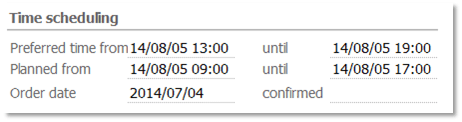
In the Processing [Time scheduling] subform, you can specify the desired date (start, end). This appointment is either desired by the customer, or one that was roughly planned by the order agent.

Service order appointment

The service action appointment can be created in the context of an order via the function bar under Panning/Set plan sta­tus. In the activity (appointment), Start/End is automatically preset. The activity is created automatically and stored in the Service actions list. The status of the service order is automatically set to in planning. No resources are yet assigned to the service appointment (responsibly, agents in the attendee list). This is done only in the planning board. Alternatively, you can create the activity by directly setting the service order status to in planning.

You can select several orders in the form overview list of an order and generate the deployment dates for them all at once.

If the planning board is then opened for an order from the function bar, you will only see the ser­vice mission appointments of this order.

Several service appointments of an order

There are rarely multiple appointments for one order. However, if several service appointments have to be cre­ated for an order (e.g., a new appointment after maintenance was not carried out correctly, etc.), there are the following possibilities:

  • Set the order status to in planning again. The system does not check whether there are service appointments for the order already. You can check this manually in the appointment list.
  • Create an appointment in the order via Activity in the function bar. Specify the appointment type and times manually (as in the standard, the location is set to the main address of the cus­tomer).
  • Then open the planning board, create a service mission appointment there, and manually assign the service order.