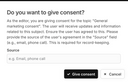
In Automations, profiles are for keeping track of the topics the visitors to your website subscribed to by ticking a checkbox on a form, and then submitting it.
Profiles
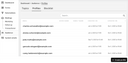
When a visitor subscribes to a topic, they consent to receiving emails on it, which is recorded in the profile created or updated in this process, next to the other data they provided, in particular their email address.
If you then create a mailing and specify a topic for it, the profiles having subscribed to this topic are added to the recipient list of the mailing.
Profiles can be identified uniquely by their email address. All the fields of a visitor’s profile are updated when the visitor uses the same email address to subscribe to a different topic or the same one again.
Working with profiles
The profiles stored in Automations as a whole do not require any maintenance. However, if, for example, someone asks you on the phone to revoke their consent, you can do this. You could even create a profile by clicking the corresponding button on the overview page, but you cannot add subscriptions to it.
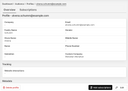
To view a profile’s details and the subscriptions associated with it, first click it on the overview page. The details that are then displayed also include the profile’s fields, as well as its creation date, and when it was last updated.
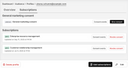
The “Subscriptions” tab of a profile lets you view or manage its topic subscriptions as well as its “General marketing consent”.
You can give the “General marketing consent” of a profile manually via the user interface of Automations if the person concerned has requested this. However, typically a person consents by submitting a form in which this option is selected. Technically, “General marketing consent” is an option a person can subscribe to, analogously to a topic.
Automations uses the “General marketing consent” from a mailing recipient's profile only if the mailing is not associated with a topic, and the recipient's consent to receiving this email cannot be determined from their entry in the recipient list, i.e., is unknown. In this case, the email without a topic will only be sent to the recipient if their profile states that their "General marketing consent" was given.
Note that the “General marketing consent” of a profile is not updated according to the consent field of the corresponding recipient’s entry in a mailing’s recipient list.
For the “General marketing consent”, as well as the individual subscriptions to topics, the consent events (actions) that led to the current consent status can be viewed.

For legal reasons, the origin or source of each and every current consent status must be documented.
The above also applies if you as an Automations user change a consent status of a profile (on behalf of the owner of the profile’s email address). You can do this via the dialog that opens after clicking “Give consent” or “Revoke consent”.