Deleted appointments with attendees

Appointments deleted in the groupware

Appointments that have already been exported to Exchange but have been deleted or canceled afterwards, automatically receive the Canceled status in JustRelate CRM. This preserves the appointment history in the CRM system, as well as important remarks in the appointment. The appointment can be reactivated if required.

The corresponding feature can be switched on via the Existence check option in the global Groupware configu­ration (global settings, variable PSA_SYN_GRW_EXP_CHK).
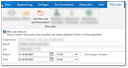
However, you can also delete and synchronize appointments in the Groupware and in the CRM manually using the CRM add-in Delete and synchronize. This add-in is available in the group­ware at the open appointment.

Attendees that have been deleted from an Exchange appointment are removed correctly from the CRM appointment.

Synchronous deletion in the groupware and in the CRM

With performance issues, both features can be deactivated via the variables PSA_SYN_GRW_EXP_CHK and PSA_SYN_DEL_APM_ATT (also on a per-user basis if required). The default is y.

If you delete an appointment in the CRM that has already been synchronized, you can choose whether the appointment should be also deleted in Exchange or not. If you decline, the appointment is marked internally, so that it remains in the Groupware. However, it will no longer be synchronized or imported. In addition, the CRM category is removed from the Exchange appointment.

If an appointment is deleted in the CRM, or the appointment is set to a final status (Canceled, Not taken place, ...), the system checks if the appointment is also available in the groupware. This feature is con­trolled by the variables PSA_SYN_DEL_APM_GRP or PSA_SYN_DEL_APM_STA.

Deleting attendees from the attendee list

If an appointment attendee is deleted from the attendee list in the CRM, the deleted attendee receives a cancellation notification. The appointment remains in the Groupware calendar, and is marked as "Open". The attendee can delete the appointment from his calendar interactively. The remaining attendees are notified of the appointment change.

Google: If an attendee is removed from an appointment in the CRM, they are sent a cancella­tion email in the course of the synchronization. However, the appointment is immediately removed from their eCal­endar, and the remaining attendees will be notified of the change.

If an appointment participant is removed in the groupware, this change is transferred to the CRM, and the participant’s assignment to the appointment is removed.