Configuring the Groupware Connector

For configuring the Groupware Connector globally, open
Administration/Data Exchange/Groupware/Global Groupware Configuration.

The Groupware server a user uses can be specified in the personal server groupware configuration or in the POP3/SMTP access list.

Global configuration of the groupware connector

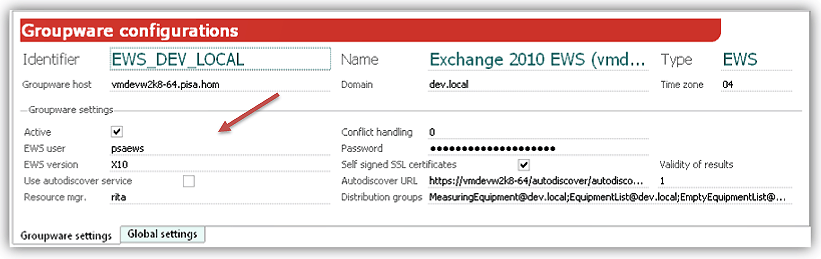
The mask allows you to manage multiple configurations, and to save each one under an individual name. The values entered in "Global settings" are valid for all configurations. You can activate or deacti­vate configurations by checking or unchecking the Active flag. This greatly improves the management of configurations during test runs and initial runs.

For easy operation and tests, groupware configurations can be individually activated and deactivated by means of a flag. The Groupware synchronization jobs only take account of active configurations.

All requested values need to be entered. For Exchange and Lotus these are:

  1. Name: Name of configuration
  2. Type: Server type
    XCH = Exchange Server 2003,
    EWS = Exchange Server 2007/2010
    LTD = Lotus Domino Server
  3. Groupware host: Host name of the server
  4. Domain: Domain name of the server
  5. Time zone (MS Exchange only): To ensure that the Groupware server displays the correct time and date, please enter the time zone the CRM server is running in. For example, 04 for Central Europe: GMT+1
    Please make sure to synchronize the system clocks on all servers involved (CRM server and Groupware server) (e.g., via NTP). Differences in time can lead to synchronization errors.
  6. Resource manager and Distribution groups are for managing the Import of resources.

Global settings tab

The entries apply globally to all configurations.

  1. Sync. begin/end: Defines the import horizon. The term horizon refers to a time range in days relative to the current date within which the synchronization job recognizes appointments. This entry feeds the global environment variables PSA_SYN_GRW_OFS_BEF and PSA_SYN_GRW_OFS_AFT. The stan­dard in the CRM is set to -7/+90 days.
  2. Begin/end of search: Defines the horizon used when an appointment that has already been imported cannot be found through the Groupware ID or the CRM GID. In this case, other criteria will be used to search all appointments within the time frame. If the appointment can be found, an update in the Group­ware is performed. If it cannot be found, a new appointment is created in the Groupware. The entry feeds the global environment variables PSA_SYN_GRW_FND_OFS_BEF and PSA_SYN_GRW_FND_OFS_AFT.
  3. Private items: Use this to specify how to synchronize private appointments. For further details, see Private appointments.
    • n = no synchronization
    • * =  masked synchronization
    • y = complete synchronization
  4. Options are helpful settings you can use for appointment maintenance. If, for example, appointments are maintained primarily in the CRM, then appointments and other synchronization objects created in the Groupware are not necessarily synchronized automatically with the CRM. However, objects created in the CRM are automatically synchronized with the Groupware.

For Exchange Server 2010 (EWS)

EWS Version: Selection of the Exchange server version (X07, X10).

Self-signed SSL certificates: Instructs the Connector to accept all certificates.

An SSL certificate is only valid if it was signed by a certifying authority (CA). After an "out-of-the-box" instal­lation, the server receives a self-signed certificate instead of an SSL certificate. Please also refer to the "Notes" under "Customize Java Environment".

Note: When Using Exchange Online (or another hosted Exchange), you should never accept self-signed SSL-certificates. The service provider will always use officially signed SSL-certificates.

Autodiscover: This makes it possible to use the Autodiscover service of Exchange. The service determines the currently best Exchange server when accessing a post box in a distributed Exchange Server environment (local or online).

For this, the Autodiscover flag, the Autodiscover URL and a Validity (in hours) need to be set in the Groupware configuration dialog of JustRelate CRM. When done, the Groupware Connector enters the host, which is delivered by the MS service, in the list of the POP3/SMTP accesses (Administration/Contacts/Groupware user).

The validity of the Autodiscover results depends on the dynamics of the Exchange server cluster. A value from 12h to 24h is recommended. The Groupware connector then refreshes the Autodiscover results once or twice a day. If the Autodiscover query fails, the server registered in the Group­ware host is used. For MS Exchange online, the standard host returned by the web login to MS should be specified here.

Note: If the validity is set to 0 (zero), the Autodiscover results are not saved, and Autodiscover always takes place before a post box login. This can be helpful when starting up the Connec­tor. Then, a sensible validity should be specified later.

For Lotus Domino Server (LTD)

Organization: Name of the organization. In conjunction with the user name, this forms the "short user name" used in LD.