In the configuration of the company cockpit, all elements that have the Company cockpit label (flag) in the Administration/Tools/Cockpit/Cockpit elements administration list are offered for selection.
These are:

In the configuration of the company cockpit, all elements that have the Company cockpit label (flag) in the Administration/Tools/Cockpit/Cockpit elements administration list are offered for selection.
These are:
Among others, such elements could be:
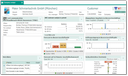
Example of a company cockpit
By means of the View field to the right in the head of the company cockpit, you can control whether the evaluation is to cover the individual company or additionally the subordinate company or corporate group structure (subsidiaries, divisions, etc.).
This gives you an overview of the orders in the last and the current business year (select menu). The revenue values are analyzed from the order cases of the contact (customer) and provided for an internal ranking. With this aid, you can evaluate your customers either by their "Revenue" or "Profit margin". However, this only works if the facts and figures are up to date. Therefore, there are jobs (for example, ABC_CLC or PSA_CLC_TRN_OVR_VAL) that cumulate the sales figures from the sales cases.
Note: You can configure the cockpit element "ABC Customer Analysis in Period" with Lead Lifecycle only for a company cockpit.
As a user with administration permissions, you can find the ABC Analysis of all Companies or Revenue summary of all Companies functions also under "My Company" if the job runs too rarely. You can also adjust the Business year here. See also: Requirements for an Analysis in sales.
Recalculation of the sales data of all sales cases (sales price) valid in the current business year for the respective customer. The existing sales data is overwritten. For companies that are structured, the values are then assigned to the individual company structures that are managed as customers in the sales case.

Attention: This calculation can sometimes take a long time, and during this time it is not possible to work with the system! The calculation overwrites all turnover data that have been entered or calculated in the company so far.
Automatically provides a customer ranking from the turnover of all transactions of the current business year and distributes it to the respective customer data records.
Attention: This operation can modify many data records.
Capturing information about the external company that is of interest to the sales forecasts and sales trend, i.e. tracing and evaluating the genesis of a customer, marking and evaluating the attendee statuses from the lead production up to the customer. The lead life cycle consists of the status of the contact (lead) as well as data of the first cases up to the first delivery. The life cycle is initiated when the corresponding record (contact record, case) is first created.
You can configure the "Last communication" element. The search can be restricted to an activity with specific classifications (main classification such as sales, service, or any other classifications like request) or a particular type (appointment, phone call, etc.).
The default is the "customer communication" classification that is assigned live and by a job if the activity has specific characteristics.
See also: Activities and tasks, Main classification, Classification as customer communication
The search condition for the "Last communication" cockpit element is adjusted for the item to exactly show the recent activity with its final status and start date in the past at the company that matches the types and classifications set in the configuration dialog.
In the user and company cockpit, an action panel can be added for quickly entering activities and cases related to the company. The element is offered in the configuration under "Other", "Action panel".
It displays a simple registration form in which you, after selecting the desired object via a button, can enter basic information like the customer and a note with a few clicks, and inform other employees by selecting the responsible person, or by means of a message. If desired, you can open the object in the master form to further qualify it there.
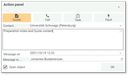
Action panel cockpit element
The Action Panel can be configured by administrators and end users:
In the CRM standard, quick creation of the following objects is supported:
If objects from the Action Panel are created in the company cockpit, the contact selection element is preset with the company, and the selection element for the Responsible or Message recipient with the company's employees.

Admin: Administrators can provide additional functions for the Action Panel. See Managing cockpit elements.
Using the "Control: company" element in Other, you can configure the data of selected company cockpits (i.e. selected companies) to show them here in the CRM cockpit. The element determines a set of companies and passes the list to the adjacent elements within the cockpit page where such a control is in action.
Note: These and more extensive data can of course be configured directly in the company cockpit at the external company.
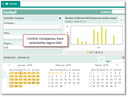
Company
For selecting companies, or restricting to them, the following is available:
The control affects the following elements: