§ GDPR: Along with a service call, new contacts may be added. When adding persons, you must observe the GDPR and data protection! See GDPR-compliant registration of persons.

Capturing a service call – important attributes
You can capture service calls using the Service (new)/Call (or Create service call) function directly from the dialogs concerned (customer or customer installation, a service object or selected activities). For complaints, such calls can also be created from sales or service orders. The reporting contact is automatically set from the database (Forwarded by ... or Customer contact in the contact list of the call).
When creating a call from a customer form or a service object (SO), important basic information is automatically adopted.
- At the customer: customer, creator, creation date
- At the service object: the customer, their service agent (if not available, the customer account manager), the parent case, and the service object with its warranty, guarantee and maintenance data
Note: All important fields and relations are available on the Master data tab of the main tab, General. Various fields and other attributes as well as the Status info can be found on the right side of the Master data form. FAQs, Trouble code, Trace back etc. are available as relations in the General tab.
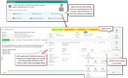
Helpdesk and ticketing – service call of the “Fault” type
With emails and phone calls, service calls can be created using the Create service call function. With emails, their sender, and with phone calls, the "Talk with … " participant determines the customer (company) of the new service call.
The "Source" attribute of the new service call is automatically set to "email" or "phone" based on the source object.
Status methods for service calls
Via the process definition, status methods can be provided for service calls which, on status changes, automatically generate, for example, a confirmation-email or define status-dependent mandatory fields. Then, when the status changes, a confirmation email is automatically presented which can be adjusted and sent. At the same time, mandatory fields are defined depending on the status.
The check function checks only that on status change all given fields are filled out. After the status change, the fields can be emptied again.
See also: Notes on escalation management

Admin: Contact your administrator if you would like to use these functions in the service.
Service call attributes
When a service call is created, all available customer or object data is automatically applied.
- Basic data of the call you should enter: Keyword, call Type, the transmitting staff member of the customer (free text if contact not in the database) and the communication media.
The system qualifies the automatically assigned ticket number with a prefix, depending on the chosen call type (CL=Question, CP=complaint, TT=Fault and 8D=8D complaint). Admin: Customizing: Call type through process definition, prefix through environmental variable PSA_NUM_ ..., selection of communication media. - Service-specific data of the call you should enter: Trouble area and Trouble type: If a service object is associated with the call and Trouble codes are stored in the system for the service object or product, the trouble area and type can be selected. If an unknown trouble area or trouble type was found, a “new entry” can be made. For this, the administrator list for the trouble area or type automatically opens if the logged-in user has the “Service (Admin)” profile. See Using trouble codes in service.
Affected Process: e.g. production, dispatch... This entry is particularly important for complaints and issues. Quality improvement measures can be derived from it.
Customer expectations, planned Measure, Priority, Case of recurrence, Trouble description and deadline.
Admin: Customizing: Menu lists: Affected process, customer expectation, planned measure, priority
General | Meaning | Annotations, administration |
|---|---|---|
Keyword | Subject of the call | Free input |
Type | Classification of calls, e.g. failure | Selection of a predefined type, represented as a process ( |
Customer | Hyperlink to the customer | Automatically preset with the customer if the call was created via the customer. |
Responsible | Responsible service agent for the customer or product | If there is a contact at the customer with the "service engineer" role, it is accepted and filled in as the Responsible. If this role does not exist, the responsible is preset with the logged-in user. Click Responsible in order to select a different responsible from the internal staff list. |
Source | Parent case; can be a sales order, a service order or in case of a follow-up call also a service call | Click Source to select a parent case from the list of cases (cases of the customer are preselected). Use the Active button in the selection dialog to have only the open cases displayed. |
Status | Status of the call, automatically set to "acquired" | The status is provided by the process definition. Adaptable via Administration/Process definition. |
Ticket number | Unique call number with type-specific prefix | Automatically assigned by the system in the form ZZ-yy.xxxxxx. The prefix ZZ can be set for every individual call type through the |
Reference number | Reference number of the customer (if assigned) | Quick search by customer reference number with further queries or calls. |
Progress, | Progress in %, automatically or manually | Progress depends on the status and is provided by the process definition. If the Manual flag is set, the status can be maintained manually. |
Open since... days | Current processing time since acquisition of the call | Calculated automatically |
Due on | Due date, usually derived from customer contracts or from the response time in the service object concerned | Free input; if the deadline is exceeded, the call record is displayed in red. |
Created by ... on... | Creator and creation date | Automatically preset with logged-in user and current date and time. |
Forwarded by | Forwarding contact of the customer | Free input, usually if the forwarding contact is not present in the contact database. Independently of the input channel, the contact is placed in the "Forwarded by" field and the "customer contact" role in the contact list. |
Origin | Communication medium | Is automatically set to "E-mail" or "Phone" according to the source object. |
Trouble area, | Supposed trouble area, trouble type | Selection of predefined entries; new entries can be entered by the administrator. There is no lock and no conncetion with the trouble code database. Customizing in the data model is necessary for this. |
Process | Affected process, e.g. production; important for analyses in quality management | Selection of a predefined process, can be adapted via Administration/Service/Service call: Affected process. |
Customer | Measure expected by the customer | Selection of a predefined customer expectation, can be adapted via Administration/Service/Service call: Customer expectation. |
Measure | Measure to be actually carried out | Selection of a predefined measure, can be adapted via Administration/Service/Service call: Measure types. |
Priority | - | Selection of a predefined priority, can be adapted via Administration/Sales cases/Priorities. (The selection is also used for service calls, service orders and sales cases.) |
Recur. | Case of recurrence | If this is a recurring call. |
Description | Details concerning the call | Free input of text. |