
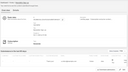
Automations records the data of each and every form submission, so you can inspect and react to it as needed. After opening a form’s overview page, the submission details are displayed as a table in which each row represents a submission, and the columns indicate the type of the individual pieces of the data that were recorded.
Viewing Form Submissions
Clicking on a row opens the details view of the corresponding submission, where you can see the full details of the recorded data.
Click “Download submissions” to obtain the submitted data as a CSV file for further processing, e.g. for importing it into a third-party system.