The weight of your email is broken down into several parts:

Key points about the weight of an email
The difference between media weight and HTML weight
- The weight of the HTML/CSS code.
- The weight of your media (image, background and fonts)
The Quality control tool, accessible from the “validation workflow” pane, enables you to manage in real time the impact of your design on media weight and HTML/CSS code weight.
The weight displayed in the quality control area is an estimate that does not take into account “Code” elements or code injected by your email marketing software (e.g. tracking, variables...).
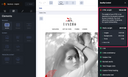
For more information about quality control, see Using quality control.
The weight of HTML/CSS
Checking the weight of HTML
The HTML weight of a newsletter can be found in the quality control pane, accessible from the “quality control” icon, in the “HTML weight” category.
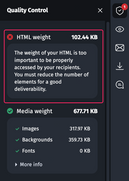
The weight of the code is directly related to the number of characters in the HTML/CSS file. Generally speaking, 1 character = 1 byte. The lighter the weight, the better for the display and deliverability of your e-mails.
Gmail imposes a weight limit of 102KB. Beyond this, your email will be truncated and your recipients will be invited to click on the “View full message” link.
This weight limit can, among other things, impact your open rate if your tracking pixel is positioned at the end of your email.
For more information on analyzing the weight of your HTML code, please refer to the article: Analyzing and optimizing the weight of the HTML/CSS code in emails
The weight of media
Checking the media weight
You can find the media weight of a newsletter in the Email Builder’s “quality control” pane, in the “media weight” category.
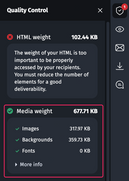
The media weight displays the total weight of:
- Visuals (image, background image, GIF)
- Fonts, if you have imported fonts into the email.
Optimizing the media weight
The weight of the media (images, backgrounds and special fonts) directly impacts the loading time of an email in messaging systems.
The greater the weight of your media, the longer users needs to wait before being able to view the entire email.
To optimize this, we recommend:
- Use images dedicated to emails, not the web. The media limit in an email is much more restrictive than on a website. Your website’s images are likely to be too heavy for emails.
- Compress your images and GIFs using compression tools such as Compressor.io or Tiny Jpeg.