Although constantly evolving, emails often still don’t fully comply with web accessibility standards.

Improving email accessibility
To be compatible with older email clients or those that don't follow current HTML and CSS standards, we have to use HTML tables (<table>) for the page layout. Although old-fashioned, this practice is necessary to ensure better compatibility across different email clients.
However, the Email Builder is resolutely committed to the mission of making email and the web more accessible and inclusive. Here are a few measures we've put in place to help you improve the experience for the readers of your emails:
Automatic language assignment
The Email Builder automatically detects the language of your email and adds it to the generated email code. This feature helps assistive technologies (e.g., speech synthesis) to better interpret the content.
You will see new lang and xml:lang attributes at the beginning of your emails indicating the detected language:

To learn more, find additional information on the w3c website.
Use semantic titles
The Web Content Accessibility Guidelines (WCAG) recommend using structured headings (h1, h2, etc.) to improve document navigation.
Unfortunately, they are tricky to use in emails, as they often generate visual inconsistencies.
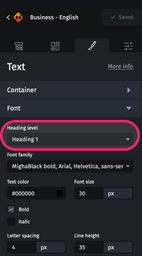
In emails, the Email Builder therefore uses role=‘heading’ and aria-level attributes to avoid impacting emails visually while maximizing accessibility.
In the Designer, select the text element concerned, and then define its heading level using the field provided.
To learn more, find additional information on the w3c website.
Keyboard navigation
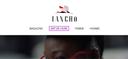
The ability to navigate emails using the keyboard is a crucial aspect of accessibility. The Email Builder generates the code needed to provide users with visual feedback on keyboard navigation, without degrading the experience of mouse users.
When using keyboard navigation, a purple frame is displayed on clickable elements.
Keyboard navigation is explained in these two articles:
Ignore unnecessary elements
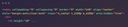
The Email Builder uses attributes such as aria-hidden=‘true’ or role=‘presentation’ to indicate to assistive technologies which elements should be ignored because they do not contribute to the meaning of the message.
This practice, which complies with good accessibility practice for web applications, can be applied to emails:
To learn more, find additional information on the Mozilla website.
Link management
The WCAG recommend using the target=‘_blank’ attribute carefully to avoid confusing users.
We strongly recommend not using this option, and leaving the choice to the user.
A judicious use would be to reserve this feature for outgoing links in your environment (e.g., links to social networks, to another website, etc.).
In conclusion
Accessibility is a constantly evolving field, and while we can't automate everything yet, it's crucial that you actively participate in this process by understanding and using the tools available to you on our platform.
Improving accessibility is an ongoing process, and we are committed to continuing to update our platform to make the web more inclusive.
And that's not all. Accessibility is also a question of design and layout. Check out our blog article about Email accessibility.