With task-related profiles, you can quickly assign views or give access to modules to individual users.

Assigning Profiles – View on the Application
Assign profiles in the Functions tab of the user administration opens the profile matrix.
The task-related profiles always have View, Master and Admin. You can recognize these profiles in the profile matrix by the fact that all three fields can be written to.
The profiles define, for example,
- which users can "View" profile-relevant data, e.g. the “Sales” tab in the contact form,
- who, as a "Master", is offered objects for profile-relevant master data in the top menu, for example, the "Sales" top menu item, so that they can create and process sales cases,
- who, as an "Admin", receives objects for profile-relevant administration data in the administrator menu. For example, only “profile: Sales-Admin” offers the administrator menu, limited to the selections "Sales", "Invoices" "Processes".
See also: Tabular overview of the Standard profiles as PDF
Note: The level of access to methods (View, Master, Admin) by means of profile assignment is not related to the level of access to data record (read, write, delete).
Other default profiles are automatically assigned to a new user and do not always offer all three options. You can recognize this by the gray fields that cannot be written to (e.g. Developer).
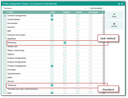
Profile configuration in the user administration

Admin: Contact administrators may only grant permissions that they themselves have. Accordingly, the access permissions of the profile assignment in the user administration were adjusted.
- The profile assignment allows users to switch on the
PSA_ADMandPSA_DEVprofiles only if they are already members of this group. - The PiSA Cubes masks can now be accessed only by "real" administrators (Sales/Development menu).
- The "Login administration" and "Group assignment" menu items are now only enabled for
PSA_ADM. - Due to 3., the "System groups" view (tab in the user administration) is alternatively opened for changing the order (ranking). The "ranking" field is editable (with pen symbol).
- The "like template" function for copying the profile assignment adopts the order of the profiles.
Use template
To conveniently assign existing user profiles to a new or existing user, use the Like template option. This makes it easy to assign the same profiles to the same areas of work, for example, without editing the options separately. By selecting a template, existing assignments in the profile matrix will be compared and can also be consolidated if required.