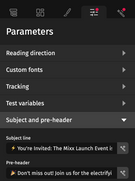
Subject and pre-header

The “Subject and pre-header” settings, available in the “Parameters” tab of the Designer, allows you to define or automatically generate these key elements of an email.

Both the subject line and the pre-header are the first elements the recipients of your emails see. They directly impact the email open rates. You can enter them manually or generate suggestions by clicking the magic wand button to the right of the respective input field.

Attention

To be able to generate a subject line, the email concerned must contain text, or at least one of the two fields must have been filled in. (If the subject line is set, the pre-header can be generated, and vice versa.)

Once the subject line and pre-header have been generated, you can of course edit them manually, or generate them again.

Dynamic generation and updating

The subject line and pre-header are generated based on the content of the email concerned to ensure that the suggestions are aligned with your message. Tone is not used as direct input.

When using Smart content functions, the subject line and pre-header are automatically aligned if they are present.

  • Rewrite for tone or brand tone adjustments causes not only the email content to be updated but also the subject line and pre-header if set.
  • Translate causes not only the email content to be translated but also the subject line and pre-header if set.