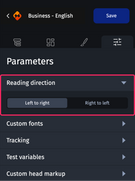
To optimize your emails for regions like Africa, Middle East or Asia, the “Reading direction” option is available. It allows you to easily write your texts in right-to-left languages (Hebrew, Arabic, Persian, etc.), while ensuring correct formatting from the start.

Designing emails with right-to-left reading direction
Step 1: Open the parameters
Open the email or module you want to work on in the Designer. From the conception pane, click on the “Parameters” tab.
Step 2: Choose the reading direction
In this tab, select the “Reading direction” category and choose the “Right to left” option.
You can then set your descriptions, titles, CTAs or alternative texts which will then be automatically displayed in the correct reading direction for the recipients, punctuation included.