Management of the roles for contact relations

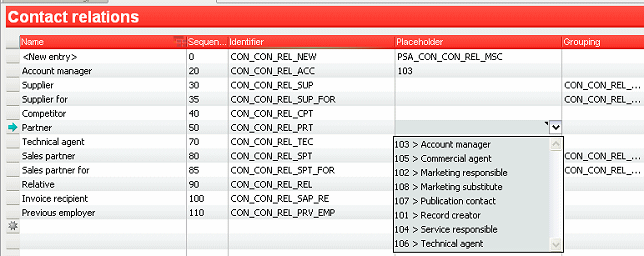
The roles in the CRM, i.e., the selections of the menu in the Role field of the Relations/roles tabs in external companies or persons, can be managed via the Administration / Contacts / Selections/Relations/Roles tabs. This concerns first of all the informative contact relations that can be assigned for any contact.

You can specify the access characteristics to roles by means of an entry in the Placeholder field. This creates a relation with the authorizations connected with the groups (Placeholders).
Management of the roles for contacts in cases and in service

You can manage the case roles in the CRM in the Role field, in the Contacts tab of quotes, order, marketing etc. using the Administration / Sales cases / Personal roles menu. In addition to the names of the Personal role and the Identifier, the pro­cesses for which this personal role should apply (offer only for process ...) need to be stated here. Only then can the personal role be selected in the corresponding object (case) for the contact relation. 

Likewise, you can specify the characteristics of the access via roles only with an entry in the Placeholder field.

Definition of placeholder for roles

If corresponding access is defined in the status of the process in which the contact relation is pro­vided with a role (Placeholder), these authorizations are transferred to the user who fills in the place­holder.